New Motorola XBT Wireless Headsets Feature SENS Technology

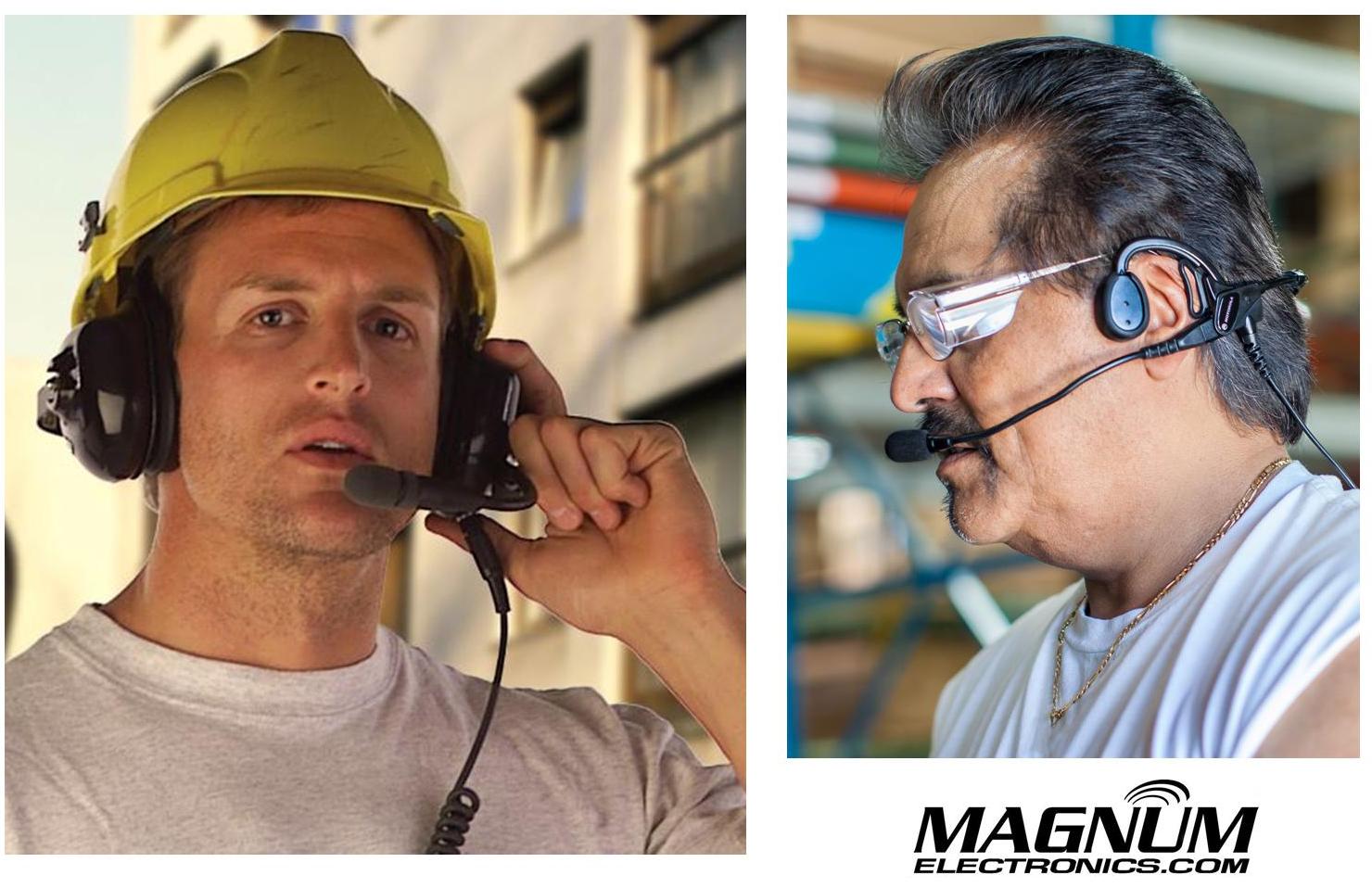
Motorola Solutions introduced new wireless Bluetooth headsets using Sensear’s patented SENSWireless Bluetooth Headset with SENS Technology spatial awareness technology that enhances surrounding voices while providing hearing protection. This feature benefits radio users who work in intermittent or continuous high noise industrial environments but need to hear nearby people, alarms, or alerts.
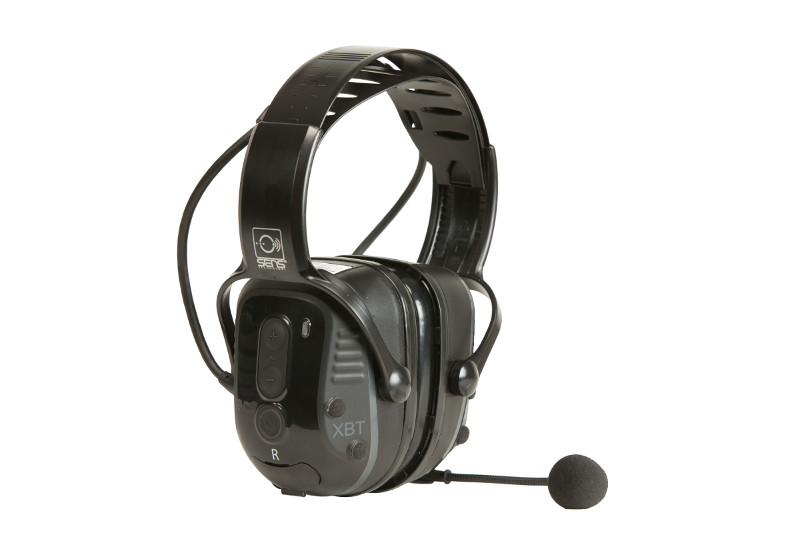
Choice of Behind-the-Neck or Over-the-Head Styles
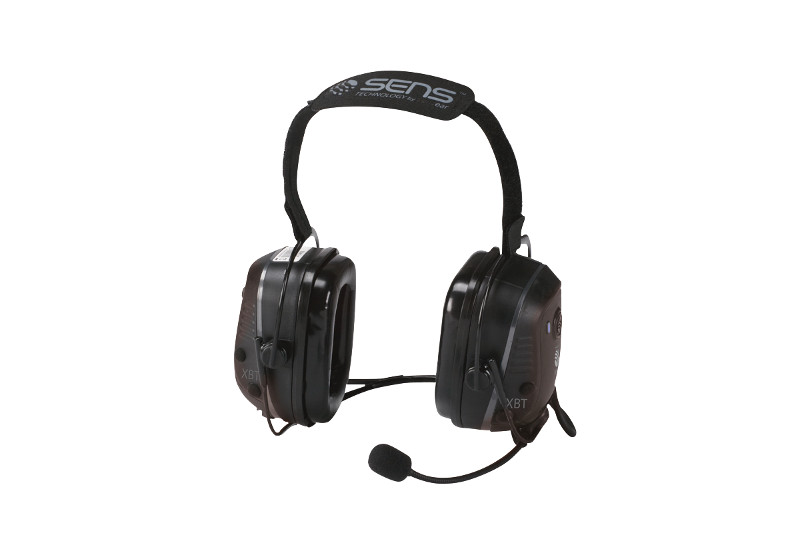
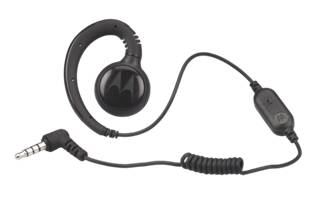
RLN6490 - XBT Behind the Head Operations Critical Wireless Bluetooth headsetThe XBT RLN6490 behind-the neck or RLN6491 headband style are designed for Motorola Operations Critical radios and adapters. Both styles provide about 22 hours of battery life based on normal (5-5-90) operation and can be fully recharged in 7 hours. These heavy-duty headsets are rated IP54 and can be used with a NNTN8127 wireless pod for remote push-to-talk operation. The RLN640 can be used with a hardhat and provides 23dB of hearing protection. The RLN6491 headband style has an even better NRR (noise reduction rating) of 25dB.

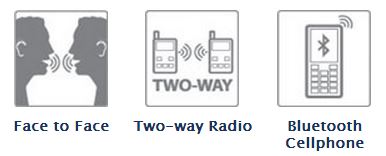
XBT Bluetooth Headset FeaturesXBT Wireless Headsets Use Standard BluetoothXBT Headsets Provide  3 ways to communicate

The SENS technology allows users wearing headsets to hear normal speech clearly when face-to-face with people without headsets. 

The Motorola XBT wireless headsets can be paired with cell phones or any 2-way radio using standard Bluetooth. For MOTOTRBO XPR 6000 series radios, choose the PMLN5712 Bluetooth adapter. XPR 7000 and SL 7000 series radios have factory installed internal Bluetooth and will pair without an adapter. APX radios and XTS 5000 PMLN5792 Mission-Critical Wireless adapters are not compatible because they contain an extra layer of encryption.

Link to the Motorola XBT Wireless Bluetooth Headsets .pdf brochure
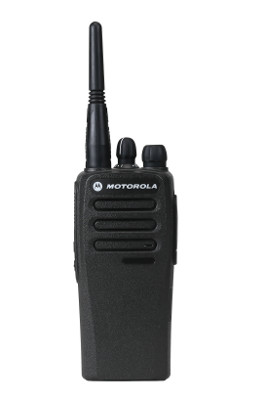
Low Cost Digital Radios for Business – CP200d, CM200d, CM300d

Motorola MOTOTRBO CP200d DMR Digital RadioMotorola Solutions Upgrades Popular Commercial Tier

The most popular two-way radios for business now support DMR digital voice communications with advanced features. The CP200d, CM200d, and CM300d can be ordered with both analog/digital operation or analog-only with future upgrade capability. They are compatible with other MOTOTRBO radios but are limited to conventional voice features. They will also support dual-capacity direct mode meaning you can have two simultaneous conversations on a single channel without a repeater.

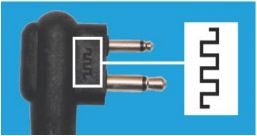
CP200d batteries and chargers are backward compatible but2 Pin Audio  Connector for CP200d audio accessories have been optimized for use with digital. Motorola’s new upgraded audio accessories are marked with a symbol on the 2 pin connector.

Improve Coverage with CM200d and CM300d with Display

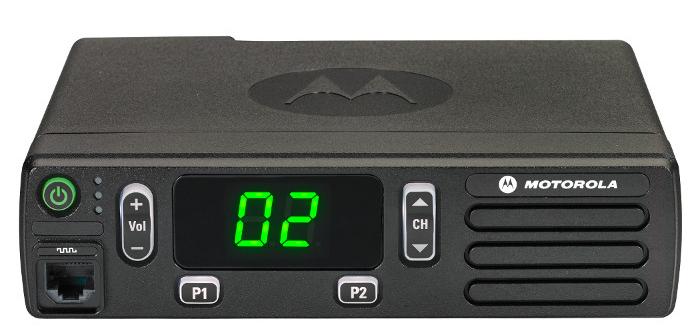
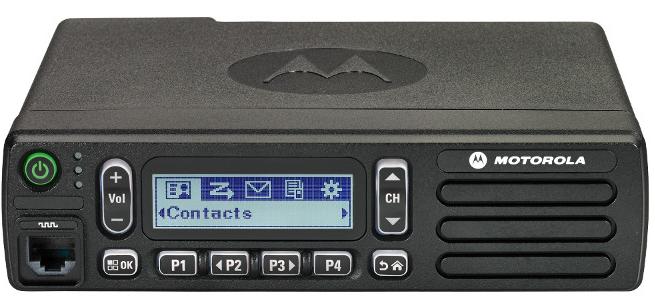
MOTOTRBO CM200d Front ViewBase, mobile, and control station operation is now possible in VHF (136-174 MHz) with 25 and 45 watt versions. UHF band will be released later this year. Both the CM200d and the CM300d support 99 channels, repeater/talkaround, and MOTOTRBO CM300d Displayvoice announcement.

The CM300d has an alpha-numeric display and two additional programmable buttons.

DMR Digital Radio Choices Slow Analog-Only Sales

The CP200d, CM200d, and CM300d are included in the “Buy 6” August Promotion that ends this month. Receive $185 from Motorola when you purchase six radios on the same invoice.

CP200 analog-only sales slowed significantly since the introduction of the XPR 3300/3500 and Vertex Standard EVX-530 series. Now it appears there is an even easier migration for commercial customers requiring basic voice communications to migrate to DMR. The most rugged business radio for the past ten years just got a new life.

MOTOTRBO CP200d Specs and Data Sheet   MOTOTRBO CM200d CM300d Specs

Why Digital is Better    CP200d Accessory Catalog

MOTOTRBO Digital CP200d Banner

Earmuff and Temple Headsets Compared

Radio Headset Comparison in High Noise

Bone Conduction vs.Traditional Earmuff Style in High Noise Areas

Motorola Solutions offers temple headsets for most two-way radio models and they continue to grow in popularity. Temple transducers use bone conduction technology and are more comfortable in hot weather as compared to traditional earmuff headsets.

Temple Headset Users TalkingTemple transducers keep the ears uncovered making it easier to communicate with the public. The speaker is muted so radio transmissions cannot be monitored and surrounding voices or other sounds can be heard normally. When used in high noise areas, earplugs can be worn for hearing protection.

Comparison Using MOTOTRBO Analog and Digital RadiosSpring and Associates HDD Driller

Spring & Associates, Inc an HDD (Horizontal Directional Drilling) contractor from Easton, Maryland relies on Motorola MOTOTRBO DMR digital radios on the jobsite.

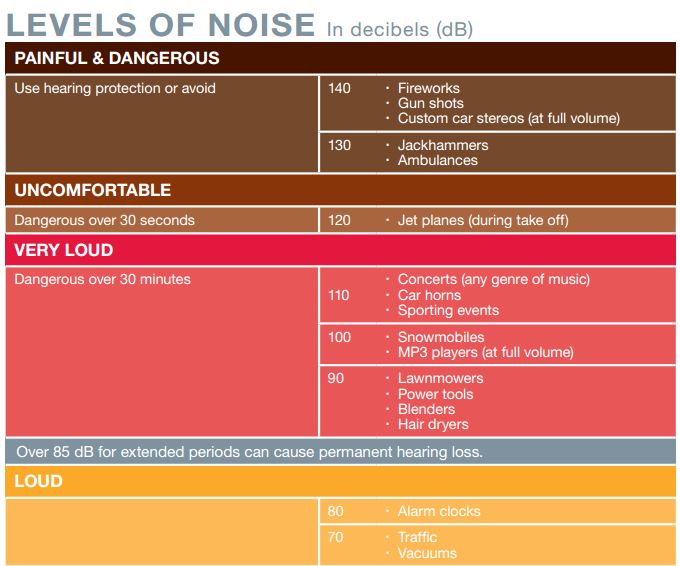
Communications are challenging because noise levels can be 100db and often exceed 130dB close to where the drill operator sits. They compared the Motorola PMLN5275 heavy-duty, dual muff headset and the PMLN5101 temple transducer.

Tests were performed in digital and analog modes using their XPR 6550 UHF two-way radios. Digital mode audio quality was found to be superior to analog. Following are comments by Rodney Spring, President  of Spring and Associates:

Muff Style Preferred in Extreme Noise Approaching 130dBLoud Noise Chart (dB)

In extreme noise, I’m guessing over 130dB, the earmuff headset was slightly preferred over the temple transducer/hearing protection muffs combo by the operator. It seems that when you idle up the drill to full power/full noise the muff headset has ZERO distortion in the receive mode, while the temple transducer has a little.

Temple Headsets Preferred Below 100dB Noise Level

In noise levels under 100dB the temple transducer was preferred because of comfort and during temporary times of low area noise, being able to remove the auxiliary hearing protection, and still be in touch with other radios while having the ability to hear people around him.

New RLN6500 MOTOTRBO Bluetooth Kit Replaces HK200

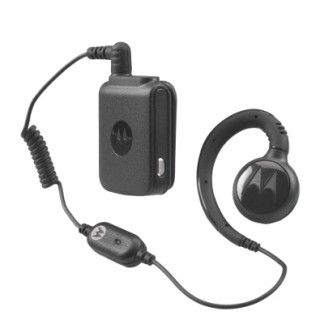
MOTOTRBO RLN6500 Bluetooth Accessory KitMotorola Solutions recently cancelled pending HK200 Bluetooth headset orders after running out of stock. The recommended replacement is the new RLN6500 MOTOTRBO Bluetooth Accessory Kit. The RLN6500 has a comfortable swivel earpiece connected to a pod with clothing clip.

The new design provides a more professional appearance and prevents others from thinking your employees are on their cell phones. Additional earpiece styles will be added in the future.

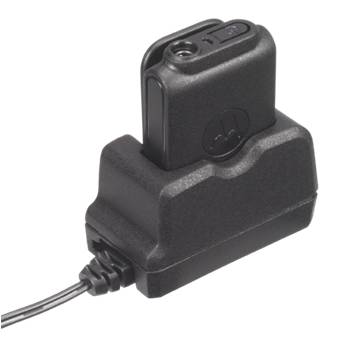
RLN6500 ChargerThe RLN6500 provides enough battery life for a full 8-10 hour shift unlike most cellular style Bluetooth headsets.

Included is a compact 120V AC charger with cradle for quick and easy charging for the next shift.

Designed for MOTOTRBO DMR Bluetooth Enabled Radios

The RLN6500 is designed to be used with MOTOTRBO Bluetooth enabled radios including the SL 7550, XPR 5350, 5550, XPR 7350, 7550. It is also compatible with XPR 6100, 6300, and 6500 series radios using the PMLN5712 adapter.PMLN6397 Replacement Swivel Earpiece and In-line Mic

It is easy to share among employees with extra PMLN6397 earpieces with in-line mic (pack of 3). The earpiece has a antimicrobial coating for healthcare applications.

Once paired, the headset will reconnect with the radio the next time it is turned on. It is not compatible with the PMLN5993 Bluetooth adapter with touch pairing so you will need to keep it paired with the same radio. The RLN6500 is not compatible with cell phones so you are less likely to lose them due to theft.

Lower Cost Alternative for MOTOTRBO Bluetooth Audio Accessories

The RLN6500 is priced lower than the Operations Critical NNTN8295 wireless earbud with pod and the NNTN8125, NNTN8126 earpieces.

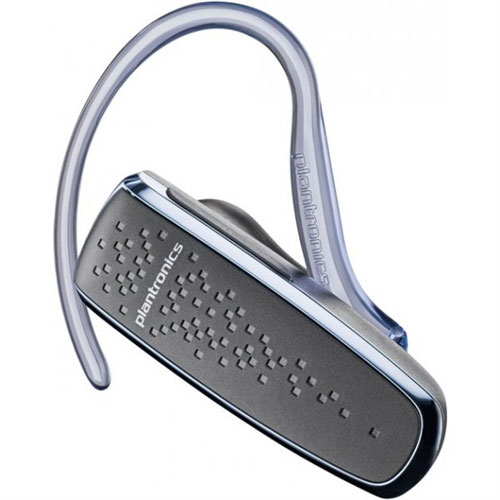
Plantronics-85550-01 M50For those who need a HK200 replacement with long battery life that will also pair with a cell phone, we recommend the Plantronics M50 85550-01.

It has standard Bluetooth 3.0, provides 9-11 hours of typical use, and uses a micro-USB charger connector.

For more Motorola Bluetooth accessories download the Operations Critical MOTOTRBO Wireless Accessory Catalog.

Tips To Minimize Driver Resistance When Deploying GPS Fleet Tracking

Magnum AVL Logo Truck and MapAs fuel prices rise, more business owners and managers with smaller fleets are looking at GPS tracking. It is difficult to compete in today’s economy without the productivity gains of GPS fleet management.

Some small business owners are concerned that installing GPS fleet tracking will cause a morale problem with their employees and possibly affect their “family” corporate culture. The tips below have been used by Magnum AVL commercial and government fleet owners who have successfully installed GPS fleet and asset tracking.

Focus on Driver Benefits and Recognize Good Behavior

  • Your good employees won’t mind being tracked. They carry the load when weaker or new employees pull down the team.
  • GPS tracking provides “command & control” so work is spread evenly
  • If you use cell phones to communicate, GPS eliminates the “where are you” calls while driving.
  • You will know when they are delayed due to traffic conditions. Dispatchers can also help drivers get back on track should they become lost.
  • Proof your drivers were at the correct locations for “No Shows”.
  • Backup for invoice disputes or complaints involving your vehicles.
  • Recognize the drivers with the least amount of monthly idling time who save fuel.
  • GPS reports can eliminate driver logs and provide time card info.

Install GPS in ALL Vehicles in ALL Departments To Avoid Favoritism

Installing GPS tracking in some vehicles (but not all) can be viewed as favoritism and can be perceived negatively by the drivers who are tracked. If you can’t afford to do the entire fleet, look at a leasing or renting the equipment.

Start Saving Fuel With Magnum AVL GPS Fleet ManagementMagnum AVL Logo

Magnum AVL uses state-of-the art equipment with a 3 year warranty, a Google mapping interface, and no long term contract. We have customers from Delaware to California. Contact us using the form below to discuss your requirements or call us at 302-734-9250.

← Back

Thank you for your response. ✨

New PDF Library Added to Magnum Web Site

Magnum Electronics Mission Statement

In an effort to provide more reference and technical documents for our customers, this week we launched our new PDF Library. It contains PDF files of spec sheets, manuals, and user guides for our products and services – all in one central location. More than a hundred documents are available now and more will be added weekly.

PDF Library Categories Include Links to Web Store

Motorola Platinum Channel Partner LogoOur PDF Library content is organized by manufacturer and includes Motorola Solutions and Vertex Standard radio communications equipment. Sub-categories with portable, handheld 2-way radios and mobile vehicle mounted models should make it easy to browse. Vertex Standard LogoWe also included audio accessories, batteries, and chargers with the initial rollout. All categories include a link back to the products in our Magnum online store.

PDF Library is Located at blog.magnumelectronics.com

Our blog site contains new product announcements, promotions, tech tips, and other news about wireless communications and GPS fleet management. It has become a popular reference site and receives thousands of visitors. We hope adding the PDF Library will be convenient and easier for our Customers. A monthly summary feed of blog articles will be sent to our Magnum Newsletter subscribers beginning in September.

Over-the-Air Programming Steps for Motorola DTR Digital Radios

Written by Jeremy Byler, CETsr

How to Remotely Add or Update a DTR Radio Contact to your Fleet

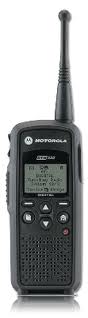
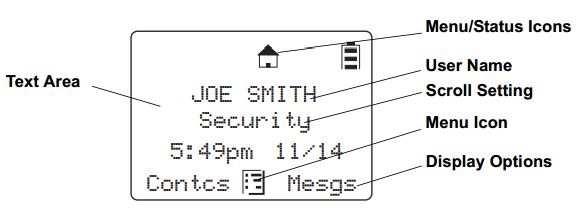
Motorola DTR650 License Free RadioMotorola DTR650 digital radios can be programmed with a unique ID so other users can identify the person transmitting. Most of our customers request that we program their radios with employee names or job functions. This is helpful during emergencies, call alerts, and one-to-one communications.Info Displayed on DTR

When an additional radio is purchased, replaced, or updated the digital ID must be programmed in all of the existing radios. This is easily accomplished using the DTR650’s over-the-air programming feature.

All DTR Radios Must Be Turned “ON” and In Range

After the new radio is programmed using Motorola’s DTR CPS software and programming cable, begin by inserting the battery and connecting the antenna. All radios must be powered ON and within range of the new DTR for programming to be successful.

Use Cloning Mode to Add Contacts Wirelessly

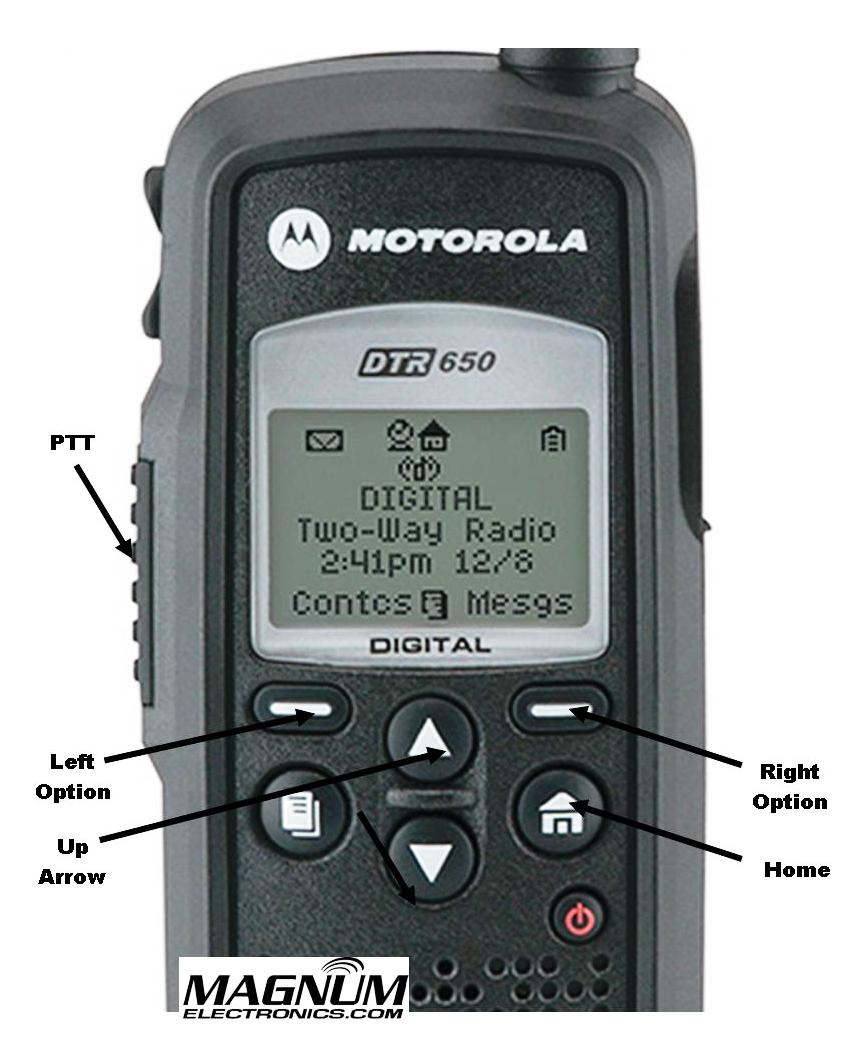
To place the new radio in cloning mode a series of button presses is required. Refer to the picture for button locations and follow the steps below:DTR Radio Button Labels

  • Hold down the “Home” button and press the PTT (push-to-talk) button three times
  • Press the “Left Option” button
  • Press the “Up Arrow” button
  • Press the “Right Option” button
  • Hold down the “Home” button and press the PTT button three times
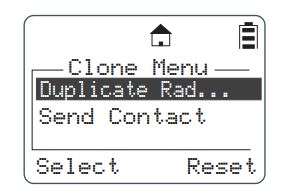
  • When done correctly screen will display cloning mode

DTR Radio Cloning Menu Mode

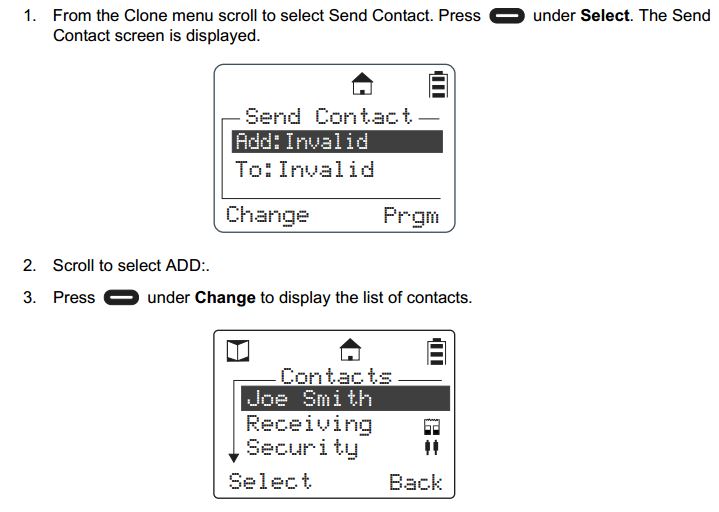
From Cloning Menu Choose “Send Contact”

When the DTR is in cloning mode, scroll to the “Send Contact” and choose the contact you want to send to the other radios per steps 1-3 below.Steps 1-3 Adding DTR Contacts Remotely

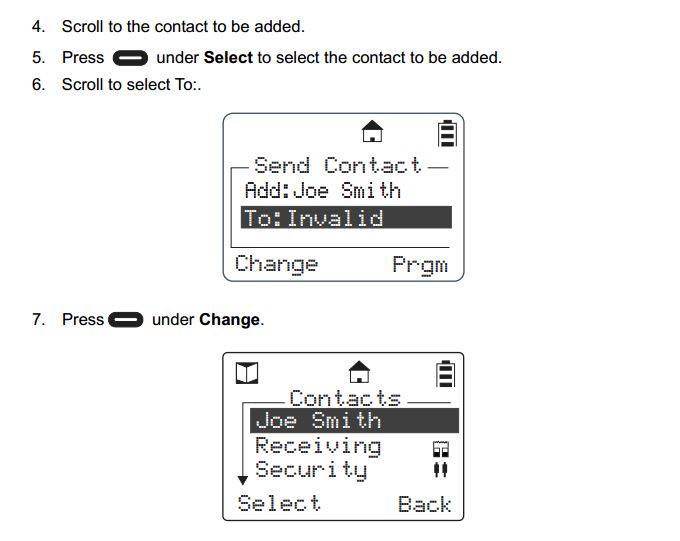
 Select the Contact You Want to Send to the Other DTR Radios

Steps 4-7 shows how to scroll through the list of radio contacts and change to the one you want to send to the other radios in your fleet.

Steps 4-7 Add DTR Contacts Remotely

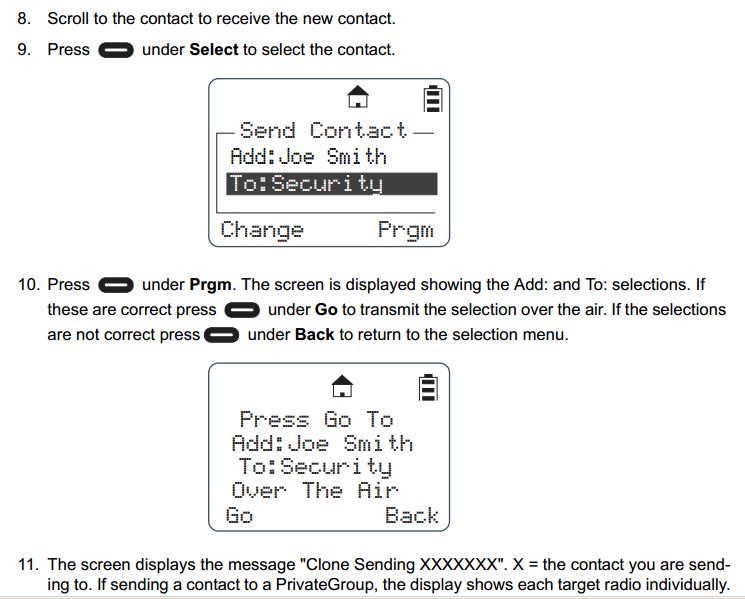
Press “Program” and “Go” to Finish the Cloning Operation

Steps 8-11 include selecting the target radio or radio group and sending the info wirelessly using the “Program” and “Go” soft buttons.

Steps 8-11 Add DTR Contacts Remotely

After operation is completed, a status message will appear. It will either display “Successful” or show a list of radios that failed. A radio will fail if it is powered off or is out of range.

If only a single radio needs to be updated, choose the name of the radio that needs to be updated instead of the group. Once this operation is successfully completed and all your radios have been updated with the new radio’s contact information, your DTR system will communicate properly.

For more information download the Motorola DTR Series User Guide and the Generation 3 DTR650 Product Training presentation from Motorola Solutions.

Firefighter Training Video – “Say It Loud and Clear”

Video

Best Practices Developed by Motorola and the IAFC

Motorola BatwingsMotorola and the International Association of Fire Chiefs (IAFC) developed a 15 minute training video to review best practices when using mission-critical 2-way radios for fireground operations. The training applies to all radio brands and models.

IAFC SealThe video shows typical scenarios how a firefighter can minimize background noise and maximize voice communications intelligibility. Whether you use analog, digital, 800 MHz, or VHF/UHF – the tips to improve audio quality all apply.

New MOTOTRBO INC Microphones Designed for Use in Extreme Noise

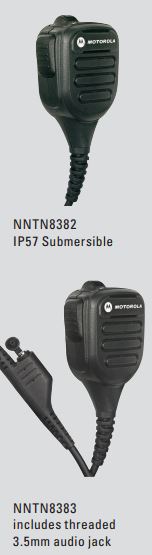
NNTN8382 and NNTN8383 INC MicsMotorola is now shipping their Industrial Noise-Cancelling (INC) remote speaker microphones for MOTOTRBO XPR 6000 and 7000 series DMR radios. The new mic speaker is 25% louder and uses dual microphone noise-cancellation technology found in high tier public-safety audio accessories.

There are two styles available: NNTN8383 includes a 3.5mm threaded jack located on the 6 foot coiled cord and the NNTN8382 IP57 submersible model without the jack.

Both RSM’s use IMPRES technology to communicate with XPR MOTOTRBO series including the 6100, 6300, 6350, 6550, 6850, 7350 and 7550 models. The mics have a 4 digit date code under the clip and carry a 12 month warranty.

Easy to Clean When Working in Dirty EnvironmentsMOTOTRBO INC Mic Being Cleaned

Dirt and debris that clog other mics can prevent the user from being heard and cause repeat transmissions. The INC remote microphones can be cleaned with soapy water and a scrub brush.

Use a High-Capacity Battery When Using INC Microphones

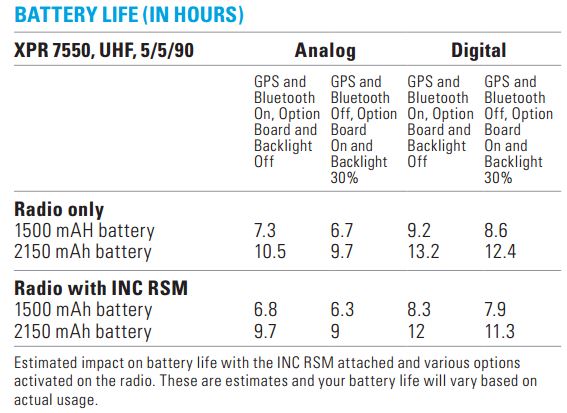
Battery Life when using NNTN8383, NNTN8382The INC microphones use the radio battery to power the extra-loud, one watt speaker and microprocessors that cancel the background noise.

We recommend using the larger 2,150 mAh IMPRES radio battery if you work long shifts, use scan to listen to multiple channels, or transmit more than normal.

NNTN8383 Requires 3.5mm Threaded Receive-only Audio Accessories

If using the NNTN8383 with the audio jack, make sure you use a 3.5mm threaded accessory plug. Some of the popular threaded receive-only accessories that are compatible include the RLN5313, BDB6726, and the BDN6781The unthreaded receive-only RSM accessories with the short cords will not work. 

Download Motorola MOTOTRBO INC NNTN8383 NNTN8382 Product Spec Sheet

Rehoboth Beach Patrol Upgrades Lifeguard Communications

Rehoboth Beach, DE

Thousands of visitors pack the narrow strip of sand at Rehoboth Beach each summer resulting in hundreds of urgent events including lost children, water rescues, and medical emergencies. Rehoboth Beach Patrol, led by Captain Kent Buckson, has been the first responder team for the resort since 1921.

Rehoboth Beach Patrol LogoNot that long ago, most beach patrols relied on semaphore flags for mission-critical communications. The visual messages took several minutes to “transmit” vital information along the entire beach. Analog 2-way radios improved communications but still lacked features required for public-safety.

Starting Memorial Day Weekend, Rehoboth Beach Patrol will improve their Motorola MOTOTRBO DMR XPR 6550 digital radio coverage by adding  a XPR 8400 repeater located on top of the City’s water tank. This will provide better radio-to-radio communications especially during emergencies.

Submersible MOTOTRBO Digital 2-Way Radios Improve Beach Safety

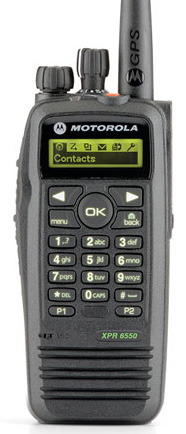
Motorola XPR 6550Motorola MOTOTRBO digital XPR 6550 hand-held radios are rugged enough to provide reliable communications from each lifeguard stand along the crowded shoreline. The XPR 6550 carries a IP57 submersible rating that protects the internal electronics from the harmful effects of sand and salt water. A bright orange silicone grip case provides additional protection and makes it easier to locate if dropped in the sand or surf.

Internal text based information from Headquarters is received on the XPR 6550’s rugged screen reducing the need for voice communications. A press of the orange button alerts the team when an emergency occurs. The radio is programmed with an identifier that provides precise location information when backup is needed.

Our Magnum Electronics team is proud to have been given the opportunity to design, install, and provide ongoing support for their next generation communications system that enhances public-safety on the beach.