GPS Fleet Management From Your Smartphone

Magnum AVL Live GPS Tracking for Android and Apple Mobile DevicesMagnum AVL Logo

Fleet location, speed, and history for up to 6 months has been optimized for Magnum AVL users with smartphones and tablets. Our new Mobile Viewer portal provides fast access from your Home screen. Set-up is simple and only takes a couple minutes using your same login info. 

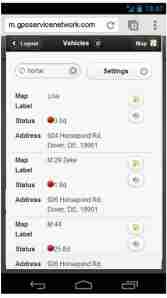
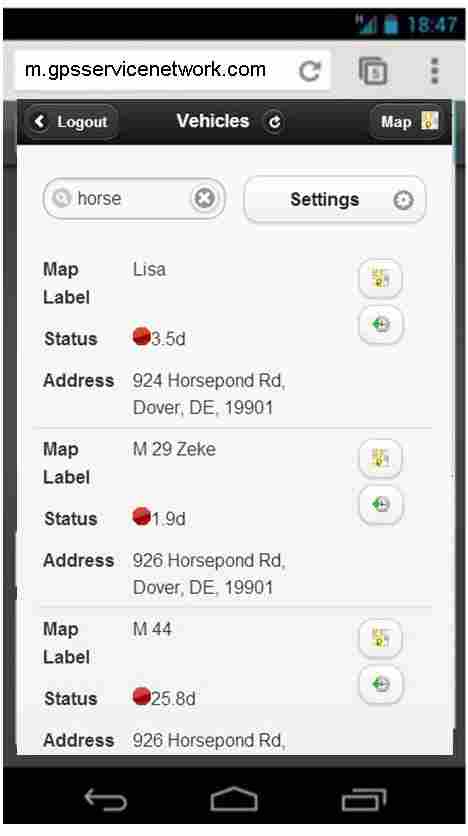
List View Can Be Customized to Show Preferred InfoMagnum AVL Mobile Viewer List View

After the single press log-in, the List View control screen shows all of your vehicle, asset, and trailer trackers. You have the ability to show (or hide) and sort the following info:

  • Map label
  • Serial number of AVL tracker
  • Status (length of stop or moving)
  • Group (for larger fleets)
  • Odometer
  • Street Address
  • Driver
  • Vehicle VIN number

Most users will want to change the default settings to hide the serial numbers and unhide the address fields.

Map, Street, Satellite, and History View Screens Provide Fast Answers

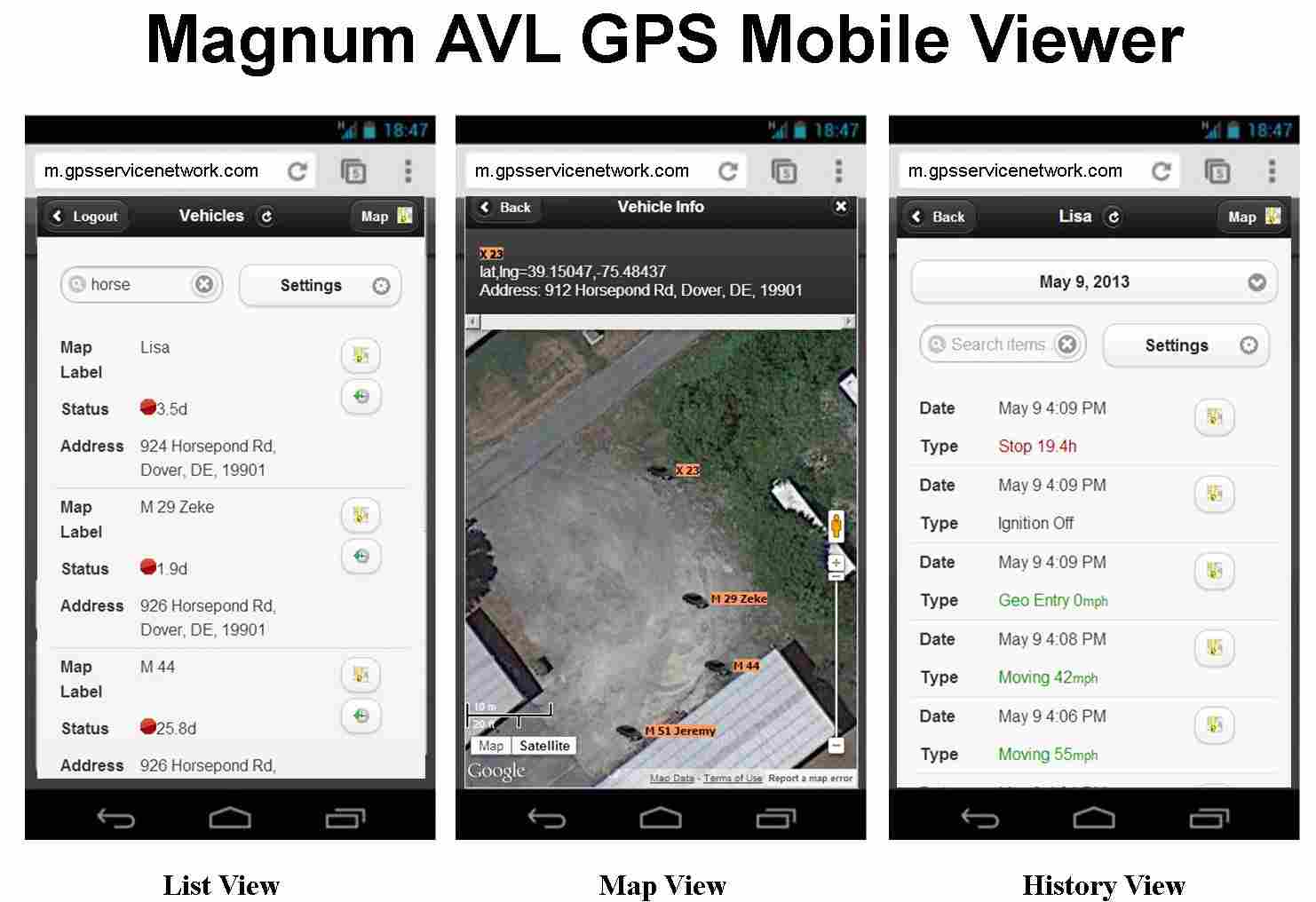
Mobile Viewer List, Map, History Screen Shots

The same icons found in the desktop version make it easy to use the Magnum AVL Mobile Viewer. From the List View screen a simple button press will launch the Map View or the History View that shows speed and location data for the previous 6 months.

Magnum AVL GPS service pricing plans do not require a long term contract. If you have any questions or need to contact us, please use the form below:

← Back

Thank you for your response. ✨

Motorola Announces XTS 5000 and XTL 5000 P25 Radio Cancellation

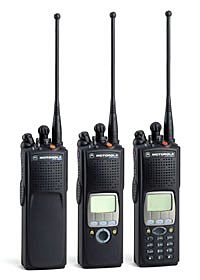
Last day to order XTS5000 is 10-31-13Motorola made it official today with their cancellationXTL5000 Last day to order 10-31-13 announcement of the XTS 5000 and XTL 5000 P25 radios. The last day to order is October 31, 2013.

XTS and XTL accessories will continue to be available with depot repair support until the end of 2018.

New and Improved APX P25 Radios are the Replacements for XTS/XTL

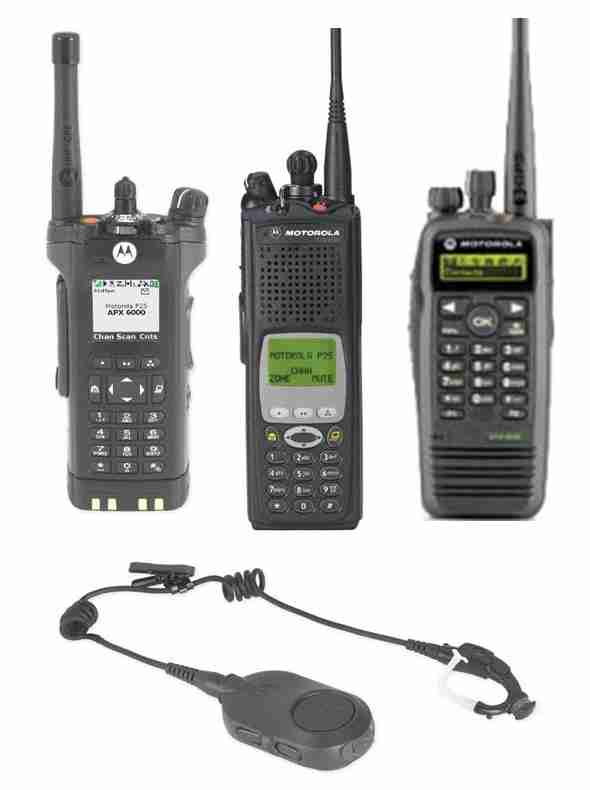
New APX P25 Portables are the replacement for XTS XTL radiosThe APX platform has been shipping for about 2 years slowing XTS/XTL shipments. Public-safety agencies prefer the new APX P25 radios because of their durability, audio quality, and advanced features.

A full complement of audio and charging accessories are available.

Motorola Trade-in Promo Reduces APX price up to $450

Motorola has a $450 trade-in offer in effect until June 26, 2013 if you purchase a new APX. This discount is in addition to any special contract pricing. For details call your authorized Motorola manufacturer’s representative.

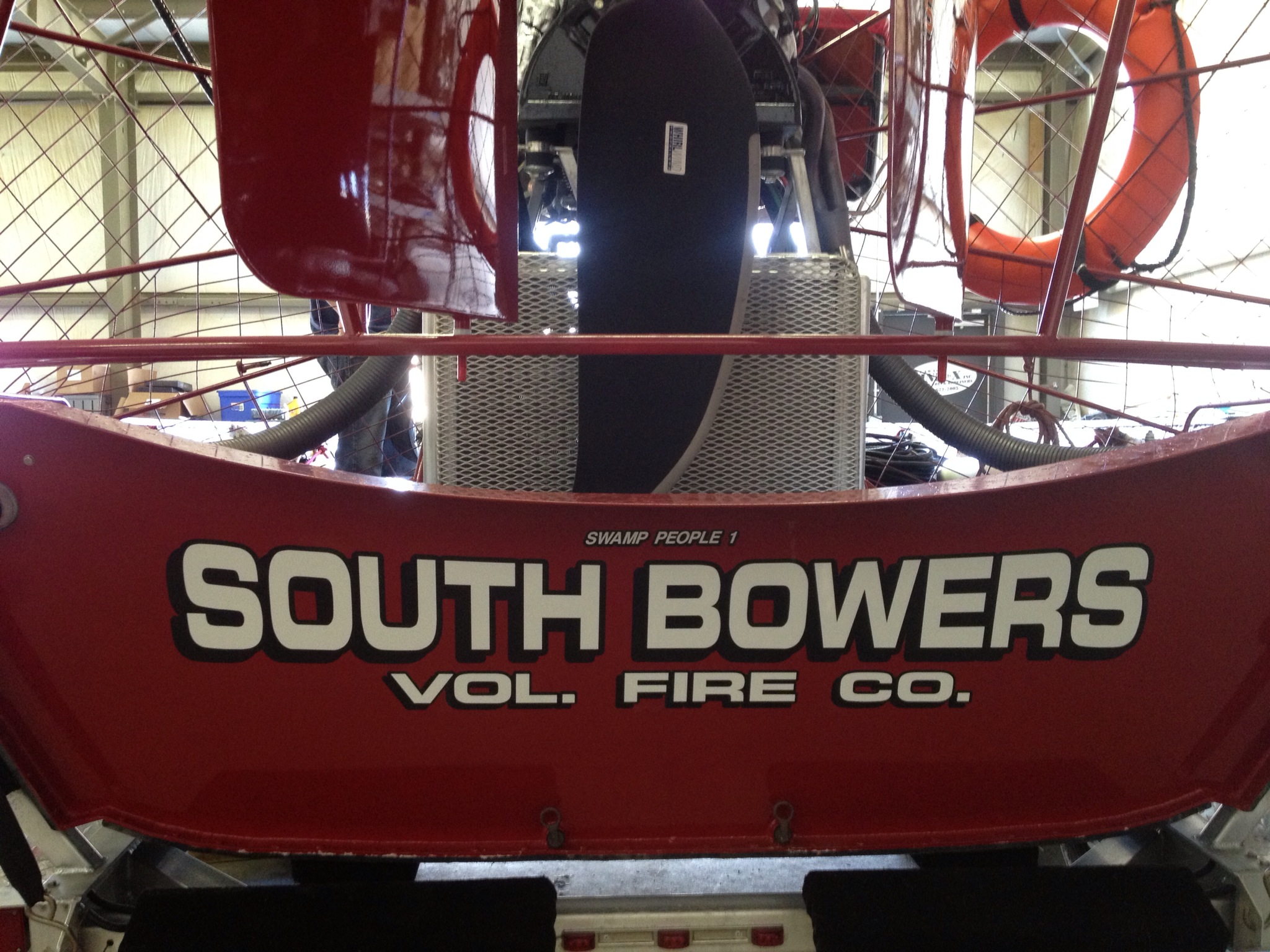
New South Bowers Fire Rescue Airboat Installation With David Clark Wireless Headsets

South Bowers Fire Rescue Airboat

South Bowers Volunteer Fire will now perform emergency rescues in the Kent County salt marshes with a new airboat equipped with David Clark wireless mission-critical communications. The system will provide hands-free, wireless intercom for the crew and will also integrate with the Delaware 800 MHz statewide first-responder system.

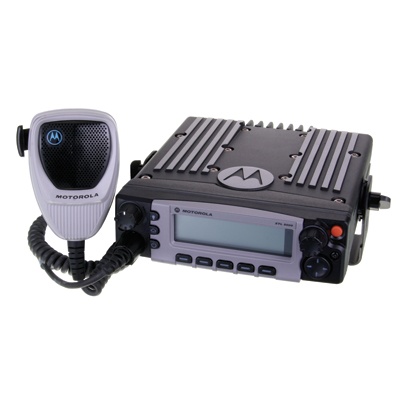
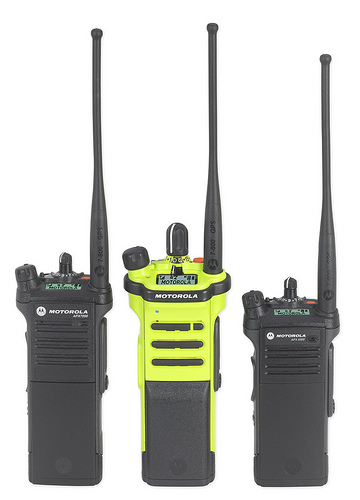
David Clark 9900 Wireless Intercom and Motorola APX 7500 Radio Integration

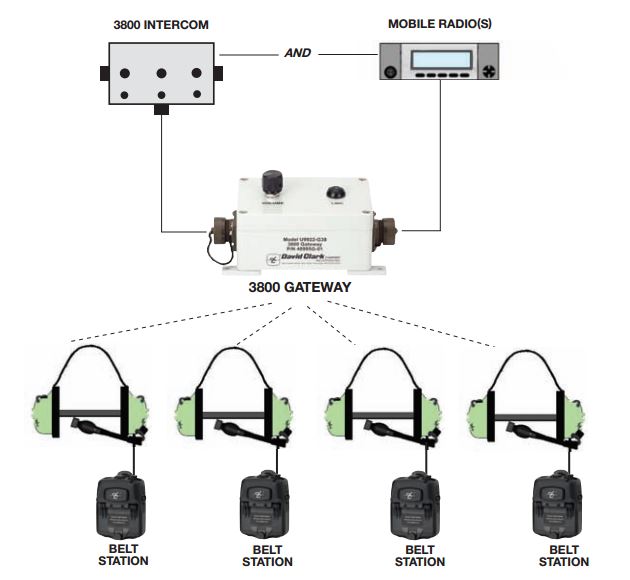
David_Clark_LogoThe new David Clark 9900 Series wireless gateway system is weather tight, rugged, and designed for marine use. It easily integrates with a Motorola APX 7500 700/800/VHF P25 capable radio and will connect to a 3800 wired system if needed.

David Clark 3800 Wireless Intercom

Wireless Intercom System Components, Key Features, and InstallationH9940 Headset

The South Bowers David Clark system uses four H9940 dual muff, behind-the-head style headsets each with a 9910-BSW wireless belt station with VOX. This design provides hands-free intercom for the crew and the ability to monitor radio traffic from the boat’s APX 7500 radio. The belt station has a PTT (push-to-talk) switch for transmitting. The U9922-38 wireless gateway acts as a repeater and provides up to 300 ft range using clear DECT based technology.

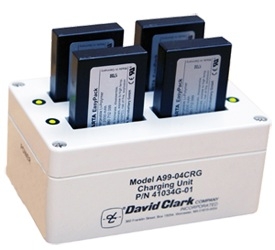
David Clark A99-04CRG ChargerThe belt stations use 40688G-90 rechargeable batteries that are removable and last approximately 24 hours after a full charge. A A99-04CRG 110V AC charger will hold 4 batteries and takes about 3-4 hours when fully depleted. David Clark has several 9900 Series headset styles a full range of accessories, interface cables, and antenna choices. The APX radio uses an 05 control head and motorcycle options for improved outdoor performance.South Bowers Airboat Installation

A weatherproof NEMA box was added for better protection and installation was completed at our Dover service facility on Horsepond Road. The David Clark 9900 wireless headset intercom system is an excellent choice for fire/ems, military, and marine applications. Our thanks to South Bowers Station 57 for the opportunity to provide the first David Clark 9900 Series intercom in Delaware.

South Bowers Volunteer Fire Delaware Airboat

New Magnum AVL Asset and Trailer Tracker GPS Service Plan

Choice of 10 or 30 Minute Live Updates for MAT312 GPS DevicesMagnum AVL GPS Fleet Management

Keeping track of your mobile assets and trailers on the move is now even easier with the addition of our Magnum AVL service plan with live updates every 10 minutes. At only $14.95 per month, you can track your assets with our web based software using Google map, satellite, street, traffic, and terrain views.

460-EQ Is Designed for Use With a 12V or 24V DC Power Source

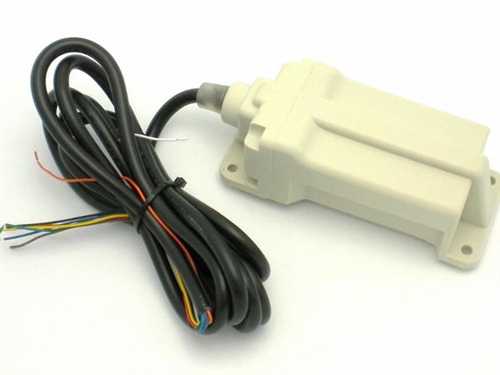
GPS Trailer and Asset TrackerThe 460-EQ GPS tracker must be connected to a 12 or 24V DC power source and includes a backup battery if disconnected. The 360-TT is specifically designed for use with tractor trailers and the 460-EQ is optimized for use with construction and other jobsite equipment. Both are submersible with internal antennas and cover the entire USA. These devices will monitor ignition, engine hours, unauthorized movement, and uses the same Magnum AVL GPS automatic reports as our 700-3W series fleet trackers.

For mobile assets and trailers without a power source, read our blog post using the GPS 660-BAT with 3 year internal battery.

For more information contact us using the form below:

← Back

Thank you for your response. ✨

Motorola IMPRES Battery Tips and Charger Indicator Lights

Proper IMPRES Battery Care Starts With Initialization

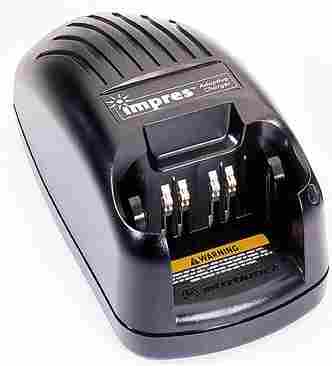
Motorola IMPRES ChargerA Motorola IMPRES battery must be initialized by an IMPRES charger the first time it is charged. This process is indicated by a STEADY YELLOW light on the charger indicator (the same as if the battery were reconditioning). The process is automatic, includes an initial reconditioning of the battery, and begins charging upon completion of this process.

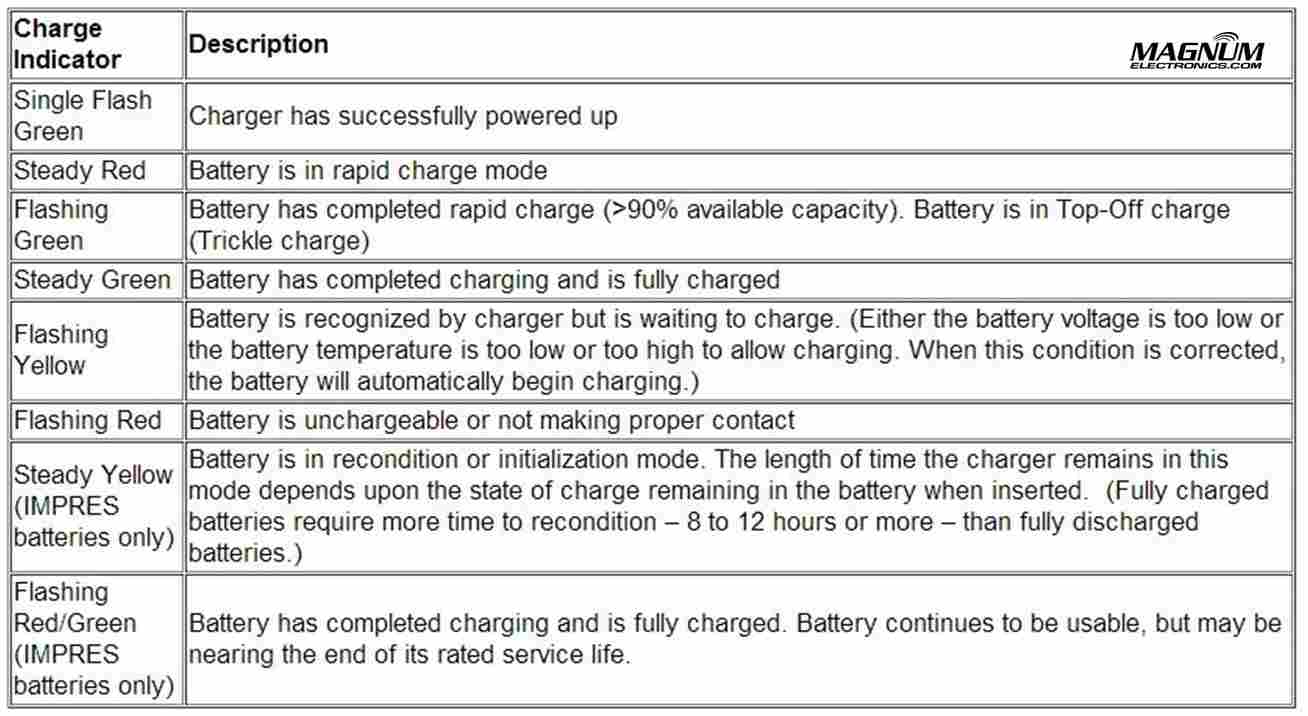
This process requires approximately 12 hours depending on the capacity. Do not remove the battery from the charger until the STEADY GREEN light is on.

IMPRES Indicator Light Chart with Explanations

Motorola IMPRES Charger Light Indicators

IMPRES Automatic Battery Conditioning

Motorola IMPRES Adaptive Chargers, when used in conjunction with a Motorola IMPRES battery, have the ability to determine the appropriate time to recondition the battery. When an IMPRES battery is properly inserted into the charger, the charger determines if it is appropriate to recondition the battery. If the battery needs reconditioning, the charger automatically indicates a STEADY YELLOW.

This process may take up to 12 hours to complete, depending upon the state of charge and capacity rating of the battery when it is inserted. It is important to note, for this process to be effective, the IMPRES battery must be allowed to complete the recondition/recharge process. Leave the battery in the charger until the charger indicates a STEADY GREEN. At the completion of the recondition cycle, the charger automatically recharges the IMPRES battery.

How to Terminate the IMPRES Conditioning Process

At any time during the reconditioning process of a Motorola IMPRES battery (STEADY YELLOW indication), reconditioning may be terminated by removing and reinserting the battery back into the charger within 5 seconds. This causes the charger to terminate the reconditioning process and begin the charging process. The charger indicator changes to a STEADY RED. The charger will attempt to recondition the battery at the next battery insertion.

Manually Initiating the IMPRES Reconditioning Process

Within 2-1/2 minutes of the initial insertion of an IMPRES battery (STEADY RED indication), remove and reinsert the battery within 5 seconds to manually force reconditioning to occur. The charger indicator changes from a STEADY RED to a STEADY YELLOW. This forces the charger to recondition and automatically recharge the battery. This is a useful feature to have when IMPRES batteries have been in storage for several months or longer. Two or three manual recondition cycles may be required to rejuvenate the batteries, due to long term storage conditions.

Complete List of Motorola KVL Encryption Keyload Cables and Adapters

Motorola KVL 3000 and 4000 Cables

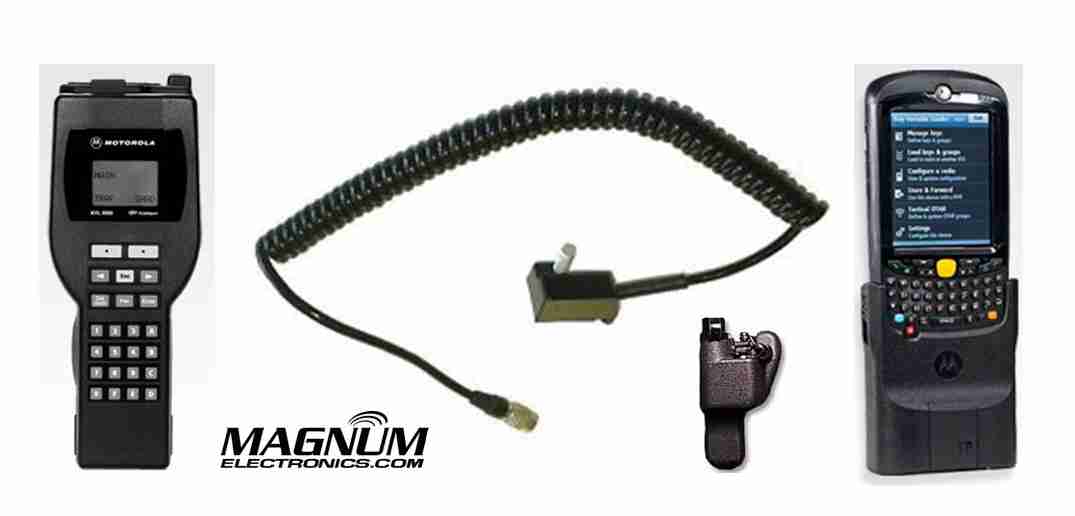
KVL 3000/4000 Keyload Interface Cables and Adapters

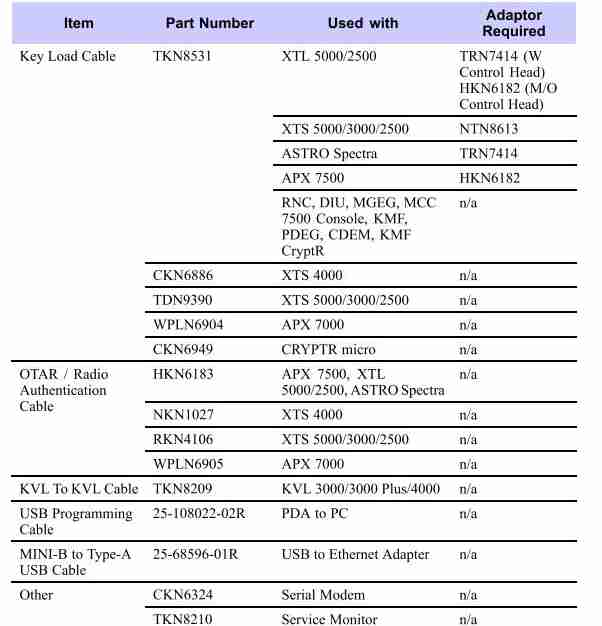
Most Motorola military and law enforcement 2-way radio communications uses an encrypted algorithm for secure voice messages. The encryption key is inserted in the radio using a KVL 3000 or KVL 4000 as shown. The basic interface cable is the Motorola TKN8531 and an adapter specific to the radio model. XTS 5000/2500 series portable hand-held radios require a NTN8613 adapter. APX 7500/6500  and most XTL 5000/2500 mobile radios need the HKN6182.

APX 7000/6000 series use the WPLN6904 cable that does not require an adapter.

OTAR and Radio Authentication Cables 

For systems using OTAR (over-the-air-rekeying) or radio authentication, the KVL uses a different set of cables without the need for adapters. APX, XTL, and Astro Spectra mobile radios use the HKN6183. XTS portable radios require the RKN4106 and APX 7000/6000 portables use the WPLN6905 cable.

For a complete list of KVL 4000 cables, adapters, and accessories, see the charts below.

Motorola KVL Interface Cables and Adapters

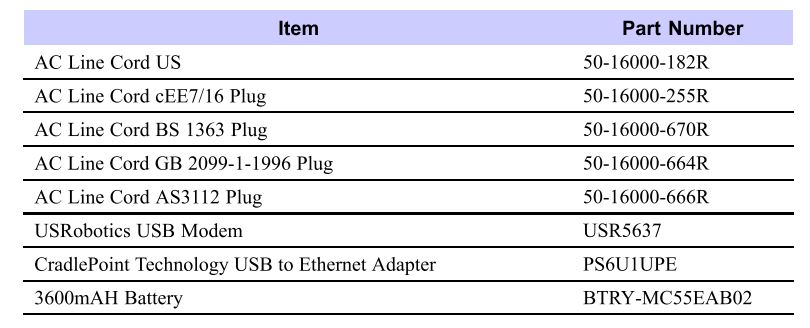
Optional accessories for the KVL 4000:

KVL Optional Accessories

How to Choose the Correct Motorola Bluetooth Accessory for your Radio

Radios_BluetoothBluetooth accessories are starting to get complicated for Motorola public-safety and professional radio models. There are now three different types of wireless audio accessories: 

  • Mission Critical with encryption and touch pairing
  • Operations Critical Enhanced with touch pairing
  • Operations Critical Standard Bluetooth

Mission Critical Wireless With 128-bit Encryption is Most Secure

For the most secure wireless communications that is extremely difficult to hack, choose the mission critical models. These are only available for APX series with the internal Bluetooth option or the XTS series with the external PMLN5792 Mission Critical wireless adapter. Motorola’s proprietary “out of band” pairing with 128-bit encryption provides the best secure connection and only takes a few seconds. Pairing takes place when the radio and the audio accessory are within an inch of each other. It does not matter which radio you use – pairing is easy and quick.

Mission Critical Wireless Accessories for APX and XTS

If you have an APX 7000, APX6000, or APX 4000, the internal Bluetooth option must be enabled. At this time, Mission Critical Wireless is only available for APX radios although it is rumored standard Bluetooth might be available in the future. It is possible to use an external third party or MOTOTRBO adapter but it would not support the encrypted accessories.

Mission Critical Wireless AdapterThe PMLN5792 external adapter is compatible with the XTS 5000, XTS 2500, XTS 1500, MT1500, and PR1500. Cancelled models including XTS3000, HT1000, MTS2000, etc. will probably work but are not supported.

Following are the mission critical accessories for APX and XTS models:

  • NTN2570 Earpiece with 12 inch cable includes NTN2571 PTT pod
  • NTN2573 Earpiece with 9.5 inch cable includes NTN2571 PTT pod

Wireless Covert KitOptional wireless earbuds (NNTN8294 11.4 inch cable) or (NNTN8295 45.7 inch cable) are available that attach to the NTN2571 PTT pod. For covert surveillance operations, the  NNTN8295 uses ipod type earbuds or any 3.5mm audio accessory.

Enhanced Operations Critical with Touch Pairing

Enhanced Operations Critical provides intrinsically-safe operation with grab-and-go touch pairing. It is only available with the MOTOTRBO XPR 6300, XPR 6350, XPR 6380, XPR 6500, XPR 6550, and XPR 6580 radios. The PMLN5993 external adapter uses the NTN2570 earpiece.

We tried the PMLN5993 adapter with both the APX 4000 and XPR 7550 after getting conflicting answers from Motorola tech support. We tried multiple times with different accessories without success.

Operations Critical Standard Wireless Bluetooth

Standard Bluetooth adapters are available for all XTS, and XPR MOTOTRBO radio models. The RMN5104 allows the XTS 5000, XTS 2500, XTS 1500, MT1500, and PR1500 to use any standard Bluetooth headset. The PMLN5712 adapter is designed for the XPR6100/6300/6500 series. The XPR5350/5550 mobile radio, XPR7350/7550 portable, and the SL7550 have internal Bluetooth included.

Operations Critical Pod

Following are the certified Operations Critical accessories:

Optional wireless earbuds (NNTN8294 11.4 inch cable) or (NNTN8295 45.7 inch cable) are available that attach to the NNTN8127 PTT pod.

Motorola APX Radio Battery Adapters for XTS Chargers

Motorola APX Battery Charger AdaptersMotorola battery charger adapter inserts are available for APX 7000, APX 6000, and APX 4000 P25 radios. The adapters enable you to use your old IMPRES WPLN4111 single and multi-unit charger chargers with new APX models. 

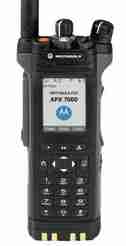
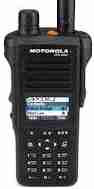
Motorola APX 6000 and APX 7000 Models Motorola APX 7000 Model III

  1. The single unit battery adapter for the WPLN4111 IMPRES charger is the NNTN7687A at a cost of $39 each. Designed to fit the WPLN4111 and WPLN4114 charger base normally used for XTS 5000, XTS 2500, XTS 1500, MTS2000, HT1000, PR1500, MT1500 radios.
  2. The multi-unit charger adapters are sold as a six pack under model number NNTN7686A at a cost of $195 per charger. Compatible chargers include the WPLN4108, WPLN4121, WPLN4181, and WPLN4130.

Motorola APX 4000 ModelsAPX 4000 P25 Radio

  1. The single unit battery adapter for the WPLN4111 IMPRES charger is the NNTN8169A at a cost of $39 each.
  2. The multi-unit charger adapters are sold as a six pack under model number NNTN8170A at a cost of $195 per charger. Compatible chargers also include the WPLN4108, WPLN4121, WPLN4181, and WPLN4130.

Magnum AVL GPS Reports Provide Powerful Fleet Data

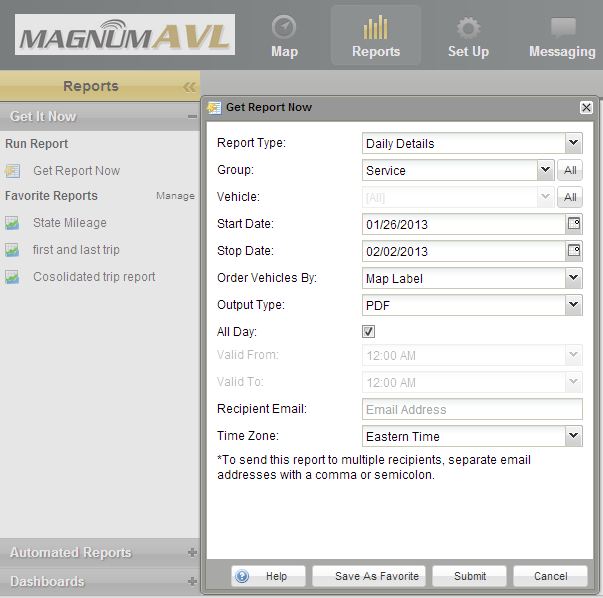
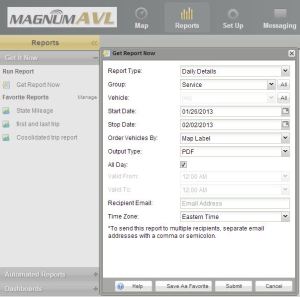
AVL Reports Menu OptionsMagnum AVL GPS fleet and asset tracking provides reports with data that will help manage your fleet and reduce costsYour fleet data is available for up to six months with the option of downloading or emailing the reports in multiple formats. 

A couple clicks and drop down menus will let you select the report type, vehicle, time frame, stops, idle, speed, etc. Once the report is created it can be saved for future use and/or sent via email automatically.

Select the Best Magnum AVL GPS Fleet Management Report

The purpose of this article is provide a list of the most commonly used reports with a short description so you can become familiar with them. All of the reports are included with any of the Magnum AVL service plans.

Daily Details

Shows the stop time, move time, distance, # of stops, # of geofences, # of Input Alerts, # of Speed Alerts of each vehicle by day.
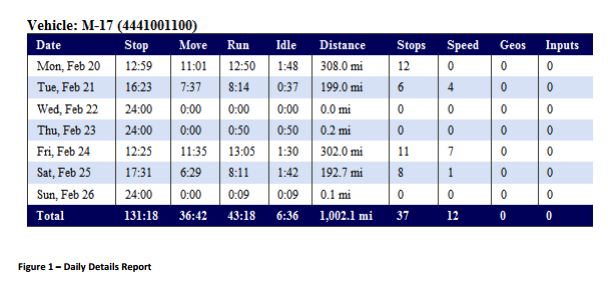
Magnum AVL GPS Daily Details Report

Summary

Shows the stop time, move time, distance, # of stops, # of geofences, # of Input Alerts, # of Speed Alerts of each vehicle for entire report period.

After Hours

Shows all of the movements for each vehicle between the start and end dates and between the hours specified in the report period.

All Geofences

Shows all of the Geofence Alerts that occurred for each vehicle between the start and end date and within the hours specified in report period.
All Input Alerts

Shows all of the Input Alerts that occurred for each vehicle between the start and end date and within the hours specified in report period.

All Speed Alerts

Shows all of the Speed Alerts that occurred for each vehicle between the start and end date and within the hours specified in report period.

All Stops

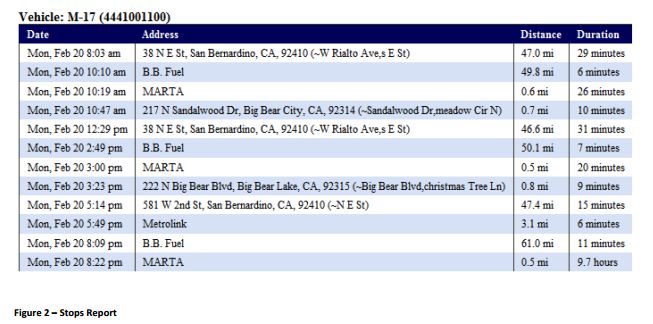
Shows all of the stops that occurred for each vehicle between the start and end date and within the hours specified in report period.

Magnum AVL GPS All Stops Report

Landmark

Shows all of the current landmarks for this account with the times each vehicle entered and exited the landmark ordered by date.

Landmarks by Vehicle

Shows when each vehicle entered and exited landmarks.

First/Last Trip By Day

Shows the start and stop times of the first and last trips of each of the days in the start/end date range.

All Trips By Day

Shows the start and stop times of all the trips of each of the days in the start/end date range.

First/Last Location By Day

Shows the first movement and last movement of each vehicle on each day.

Idle Time

Shows the amount of time a vehicle has been idling (ignition on without movement).
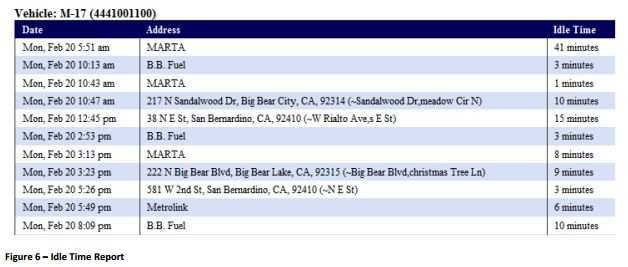
Magnum AVL Idle Time Report

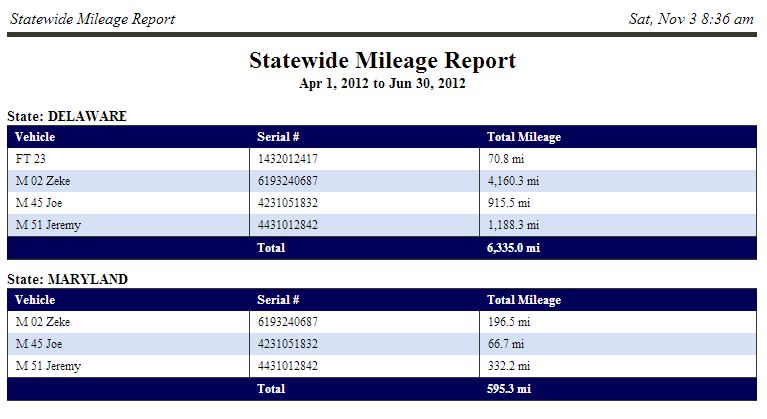
State Mileage

Distance each vehicle travels in each state over the selected period of time.. Magnum AVL State Mileage for IFTA
Consolidated Trip Report

This is a summary of all trips and includes trip distance, trip time, idle time, and trip start and stop. In order for this report to work, the ignition wire must be connected.
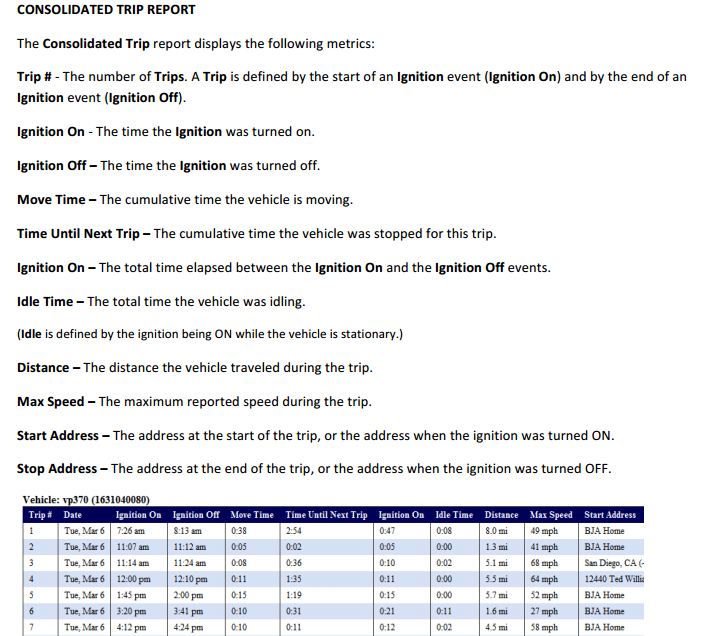
AVL GPS Consolidated Trip Report

Location History

Will display vehicle movement events, ignition events, geofence events, stop events, over speed events, etc.  Included in the report are time and date stamps for each event, as well as address, latitude/longitude, distance, and heading. Use this for backup detail with the State Mileage Report for IFTA audits. You must check the box “show addresses” to provide the required detail.
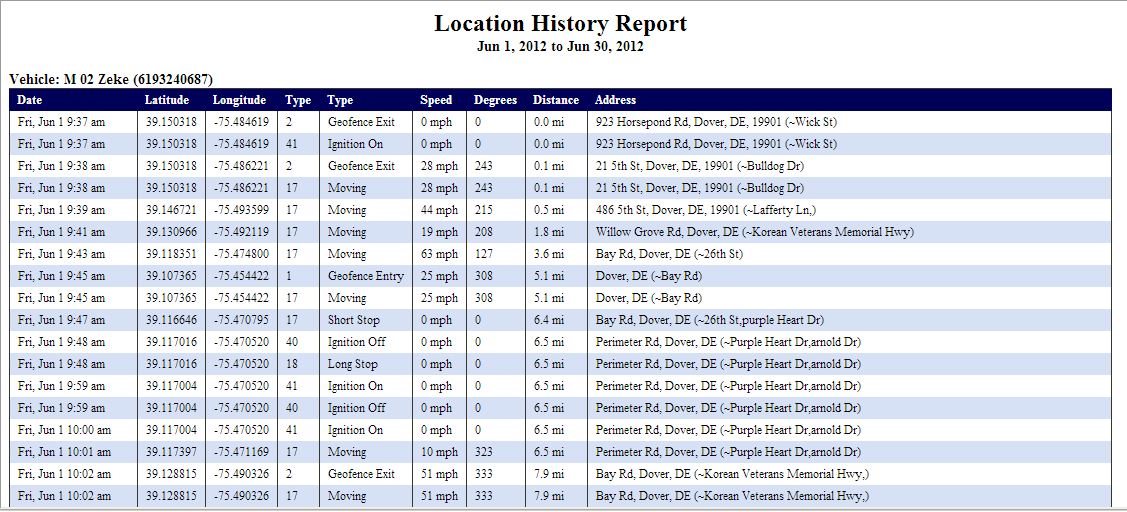
Magnum AVL Location History Report

Workday Summary

A comprehensive report that summarizes start time, move time, stop time, idle time, end time, and total elapsed time during the reporting period.
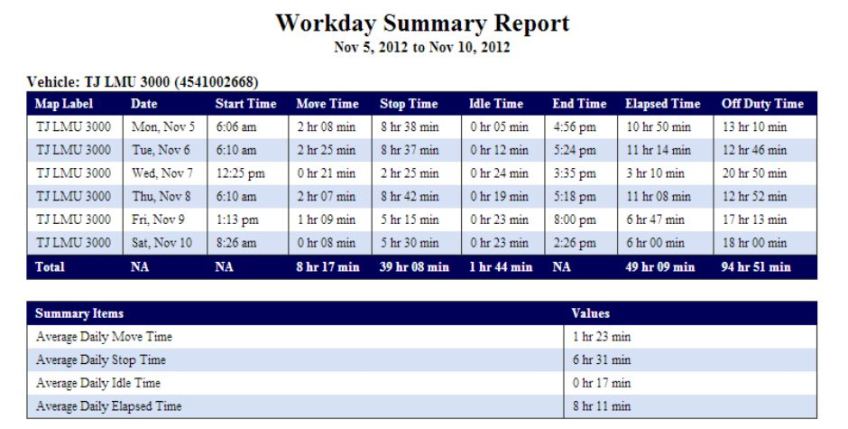
Workday Summary Report

Workday Daily Details

In addition to the data included in the Workday Summary, this report includes start and end addresses and off duty time during the reporting period.
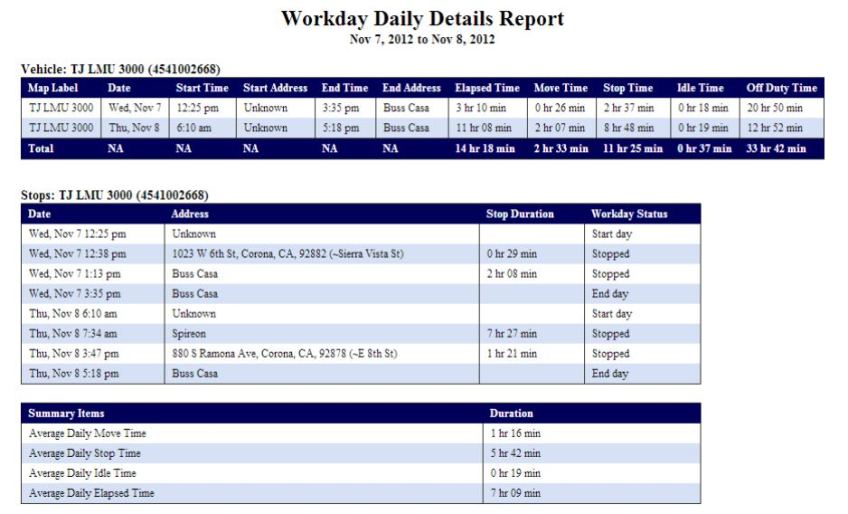
Workday Daily Details Report

How Magnum AVL GPS Local Fleet Management Impacts Your Bottom Line

Real Time Vehicle Location Data Improves Decision Making

Magnum AVL - Improving Fleet Efficiency with GPSIn today’s fast paced business environment, knowing where your vehicles are provides a competitive edge. If knowledge is power and time is money, even small local fleets can benefit from Magnum AVL fleet and asset tracking.

Knowing exactly where all of your mobile assets are in real time or being able to look back anytime during the past 6 months with a couple mouse clicks will make you a smarter organization. You will be able to quickly identify where you are losing money and make corrections faster.

Most Local Fleets Save a Minimum of 20%-25% on Fuel Bills

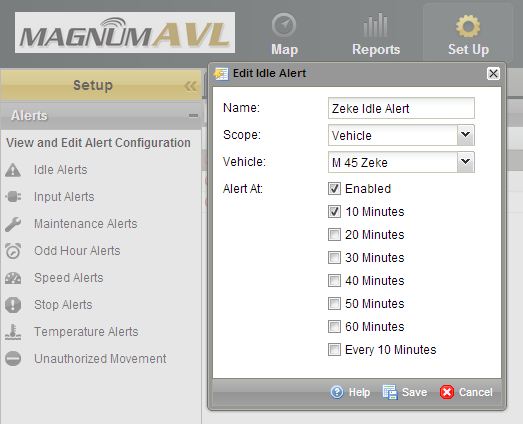
Magnum AVL Idle Alert SetupMagnum AVL provides vehicle idle time reports each day, week, month, etc. You can be alerted with an email or text message in real time after a predetermined limit has been exceeded if you desire. The average vehicle burns almost a gallon of fuel every hour so just decreasing idle time can justify the return on investment.

Speeding in a lettered vehicle not only uses more fuel but it can ruin your reputation. You can also set speed alerts with Magnum AVL to identify a reckless driver.

GPS Tracking Prevents Unauthorized Use Resulting in Fewer Miles

Fewer miles driven means going to the pump less often. How many miles per gallon do your vehicles average? If your service truck gets 17 mpg, 10 less miles per day will double your ROI. If your mobile assets are remote and don’t start/end the day at your yard this can save significantly more.

Labor and Overtime Costs Will Drop With GPS Fleet Tracking

Magnum AVL can reduce labor and overtime costs especially when there is more than one worker in the vehicle. You will know exactly when your vehicle arrives and leaves the job. Customer complaints about a driver that never showed or was there only a short time can be checked and proven true or false immediately.

If you seem to have a chronic overtime problem, Magnum AVL will provide the information needed to identify the cause. Saving 30 minutes of overtime per week can save thousands of dollars at the end of the year.

Magnum AVL Improves Employee Safety, Customer Service, and Peace of MindMagnum AVL Logo Truck and Map

Contact your drivers when they are stopped and not when they should be concentrating on the road. Let your customers know when your technicians are about to arrive at a service call. Know job arrival times without bothering the driver.

Also, many insurance companies will provide a discount when GPS fleet tracking is installed.

Interested in a Demo,  ROI Analysis, or Have a Question?

← Back

Thank you for your response. ✨