Motorola APX XTS Completely Discreet Wireless Covert Surveillance Accessories

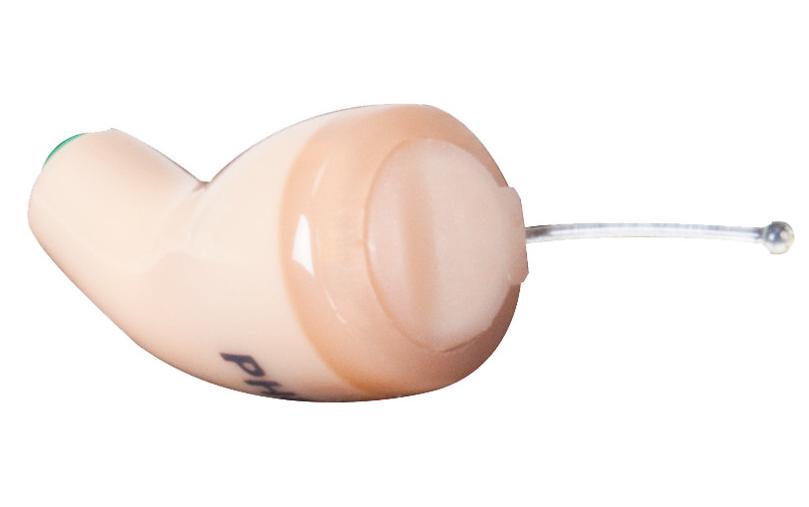
Wireless Covert Radio EarbudThe Motorola RLN4922 completely discreet earpiece is a covert wireless audio accessory inserted in the ear compatible with most two-way radios using a 2 or 3 wire surveillance kit. The earbud connector on the surveillance kit connects to the included RLN4920 wireless neckloop worn under your clothing. The push-to-talk switch and microphone on the wired surveillance accessory is still used. Recently, the RLN4922 was redesigned for more comfort, made smaller, and improved technically.

New Completely Discreet Mission Critical Wireless Covert Kit
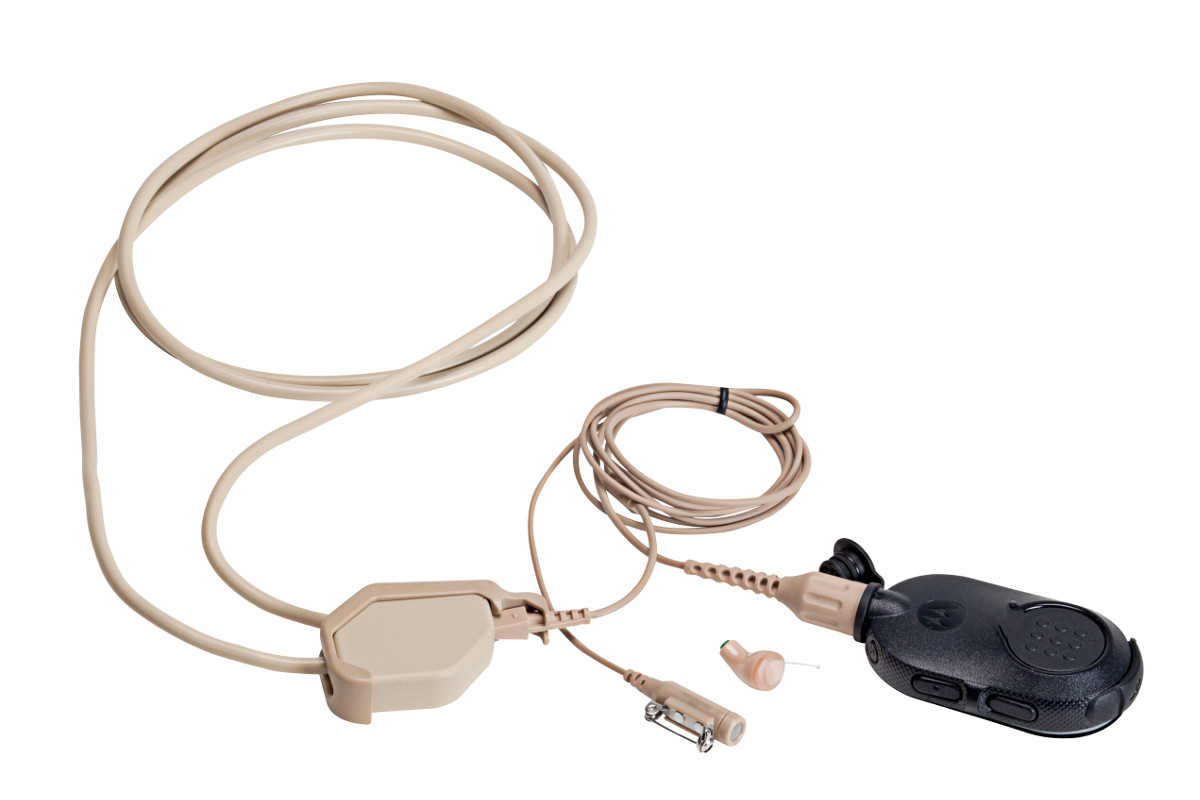
Wireless enhanced Bluetooth Covert EarpieceUsers with the Motorola APX and enhanced Bluetooth option or XTS radios with the external PMLN5792 adapter have new options for covert surveillance. Motorola’s new NNTN8434 Wireless Covert Kit includes the RLN4922 wireless earbud, NNTN8385 Y-adapter, and NTN2571 PTT pod.

Now the radio can be placed in a backpack, briefcase, or purse up to 30 feet away. The NTN2571 PTT pod uses easy touch pairing. All you need to do is place the pod within an inch or two from the radio and it will automatically connect. Now a user can select any radio available and be ready for covert two-way communications immediately. The enhanced Bluetooth is encrypted and cannot be monitored like standard Bluetooth devices.

Basic Wireless Covert Kit Uses 2 Wire Earbud Headphones
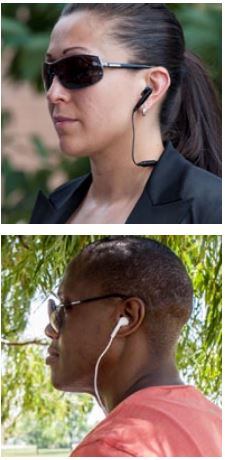
Person listening to music or using smartphoneAlso available is the NNTN8296 Basic Wireless Covert Kit that includes 3 sets of earbuds and a 3.5mm adapter for connecting any off-the-shelf commercial earphone accessory. Radio users appear to be using a smartphone or listening to music. 

The NTN2571 must be ordered separately. There is also an optional carrying case (RLN6485).

Typical battery life for the NTN2571 PTT pod is 8 hours but carrying a second pod will provide remote PTT and a spare power source for up to 16 hours of use. The pod uses a standard micro-USB charger.

For more information see the Motorola brochure APX and XTS Mission Critical Wireless Covert Solutions

The RLN4922 Completely Discreet Earpiece and wireless covert accessories are also available for MOTOTRBO Operations Critical Bluetooth. The NNTN8127 PTT pod is the operations critical wireless (OCW) version used with the NNTN8385 Y-adapter. You will also need to use the PMLN5712 or the PMLN5993 Bluetooth adapter with touch pairing for XPR 6000 series radios.

 

Boston Leather Radio Holders and Public-Safety Accessories Now Available Online

Leather Accessories for Fire, EMS, and Law EnforcementBoston Leather radio holders, fire, ems , and law enforcement accessories

Since before World War II, Boston Leather has been focused on manufacturing high quality leather goods designed for public-safety professionals. Located in Sterling, Illinois they continue to develop custom 2-way radio holders, firefighter straps, and badge holders. We now offer their entire catalog and have radio holders, fire/ems, and law enforcement accessories online with pricing.

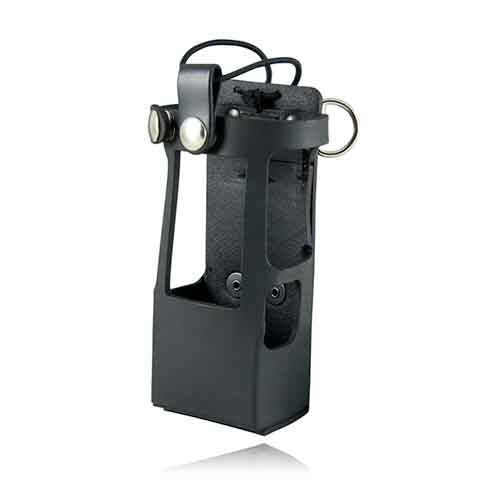
Motorola APX 6000XE Radio Holder Now AvailableAPX6000XE Radio Holder

For firefighters carrying the Motorola APX 6000XE Model 2.5 or 3.5, there is a custom designed leather holder (5611RC) with large rings that is used with their 6543 strap or the 6543R reflective strap. The case fits the standard size APX batteries including the NNTN7038 (most popular), PMNN4403, and the NNTN8092.

Boston Leather Product Catalogs

Visit our Boston Leather Products online catalog with pricing or download the current full catalog. Also available for download are the Fire Brochure and the K-9 flyer. Please contact us for a quote for any accessories not online yet using the form below.

← Back

Thank you for your response. ✨

Rules for Ordering Mobile Computer Docks; Do I need RF Pass-Thru?

Determine If your Computer Has Any RF Antenna Connectors

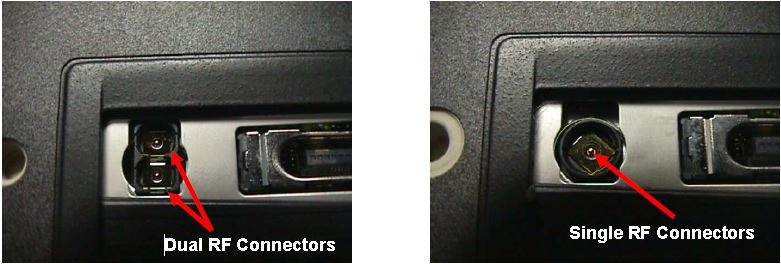
Most rugged mobile computers can be ordered with 0, 1, or 2 external RF connectors. A single connector is used for cellular WAN such as Verizon, AT&T, or Sprint and the second is used for WLAN (WiFi) external antennas. The first step is to determine how many antenna ports (if any) are on your computer.

The photos below show a Panasonic CF-18 with one and two RF connectors:

Computers with RF Pass-Thru

If your computer does not have RF connectors, it will only work in a docking station that has no RF pass-through capability.

If Computer Has RF Pass-Thru Follow These Rules For Dock Purchases

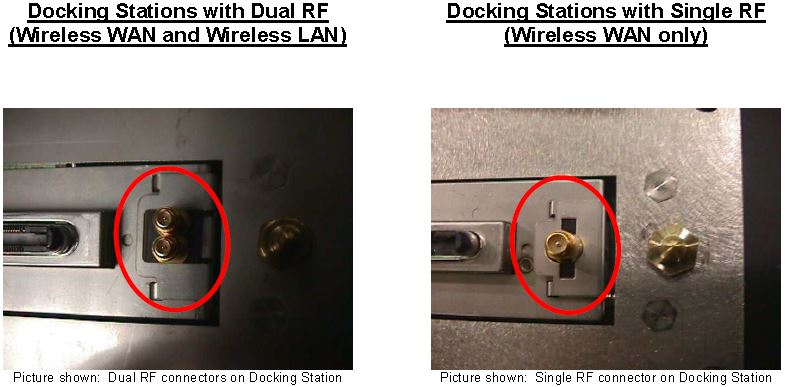
Docks with Single and Dual RF Pass Thru

If your computer has RF capabilities you can use a docking station that has:

a) has no RF pass-through or

b) you must match the RF capabilities (Single or Dual) with the RF pass-through on the docking station (Single or Dual).

For example:

  • If you have a single RF computer, you can order a docking station with single RF pass-through or non-RF pass-through
  • If you have a dual RF computer, you can order a docking station with dual RF pass-through or non-RF pass-through

For more information on Panasonic, Gamber Johnson, or Havis docks call our office at 302-734-9250 M-F 8-5:00pm EST or use the form below.

← Back

Thank you for your response. ✨

Light Indicators and How to Pair a Firecom Wireless Headset

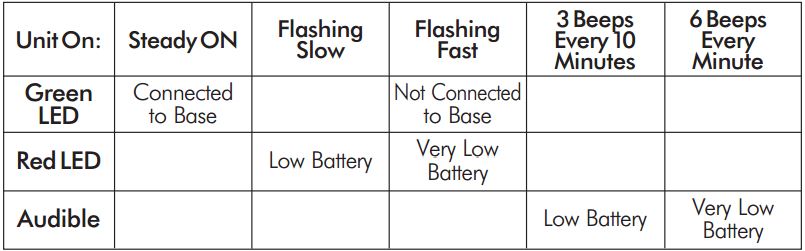
Firecom Wireless Headset LED Indicator and Audio Beep MeaningsFirecom Wireless Indicator Lights

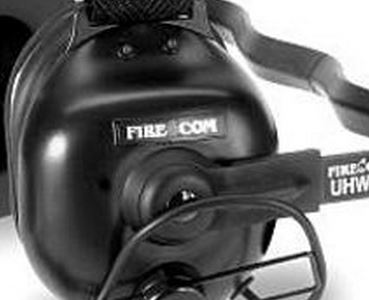
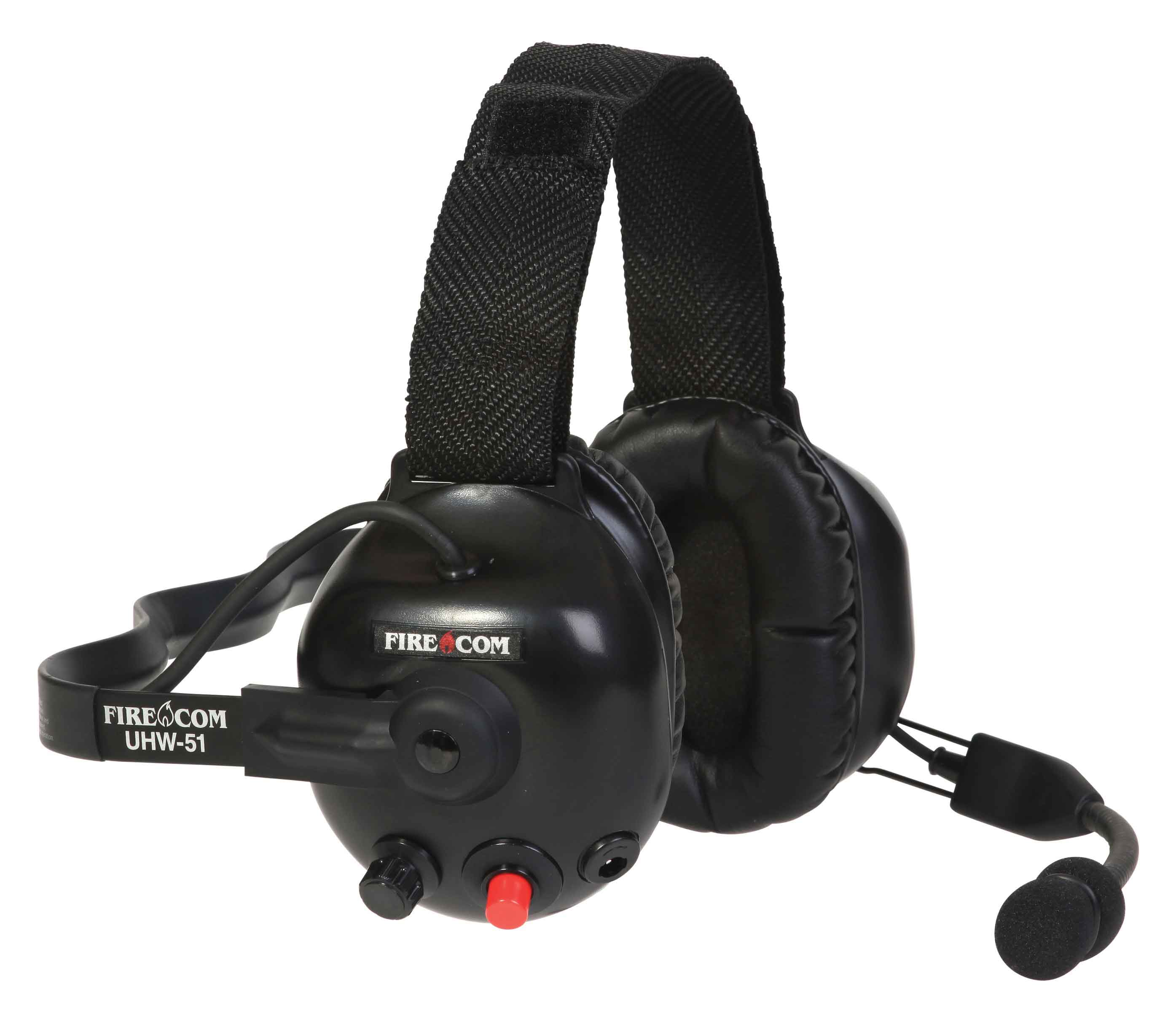
Firecom wireless headsets have one green and and one red LED indicator light on the top left ear dome (microphone side). The lights and audio beeps provide the user a quick indication if the headset is connected and the battery is charged.

Indicator Lights When Connected to Charger Cable

When the charger is plugged into the powered OFF headset it will show RED when charging and GREEN when fully charged. Charging takes 2 hours and will provide about 10 hours of normal operation.

When powered ON and charging, the light meanings are:

  • GREEN ON, RED ON: Charging, headset linked to base
  • GREEN ON, RED OFF: Charge complete, headset linked to base
  • GREEN Flashing, RED ON: Charging, headset not linked
  • GREEN Flashing, Red OFF: Charge complete, headset not linked

Indicator Lights When Charging Cable is Unplugged

Below is a chart that shows what the light and beeps mean when the headset is powered ON and the charger disconnected:

Wireless Headset Indicator Light  ChartFirecom Wireless Headset Pairing Procedure & Video

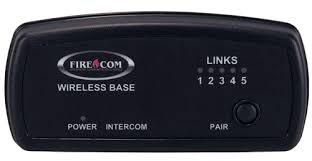
Firecom Wireless BasePress and hold the pairing button on the base for approximately 6 seconds until the yellow LED(s) on the base station start flashing, indicating pairing mode. When placed in pairing mode, you have about 15 seconds to place the headset in pairing mode.

Firecom Wireless UHW-51 Press and hold the PTT button, turn on power to the headset. After approximately 5 seconds, the green and red LEDs on the outside of the left ear dome will start flashing in a relatively fast alternating pattern. Release the PTT button.

Monitor the headset lights. After about 6 seconds, the flashing pattern ends, the green LED will flash for two seconds and then the green and red LEDs will indicate the headset is paired and linked to the base. The LINK LED on the base will illuminate steadily after flashing rapidly for two seconds to indicate that a link to the headset has been established.

Can You Identify Your Fleet’s Idling Hidden Cost?

How much is idling costing you?Unnecessary engine idling reduces your fleet’s miles per gallon and increases maintenance costs. Most vehicle manufacturers now recommend a maximum of 3-5 minutes of idling before either turning off the key or beginning your trip. According to http://idlefreevt.org a medium duty (class 3-6) diesel or gasoline truck burns 0.4 to 0.6 gallons per hour. A heavy-duty (class 7-8) diesel truck burns 0.8 to 1.0 gallons per hour.

The chart below shows the annual cost of idling for 1, 10, and 25 trucks:

Fuel Cost for Fleet Idling

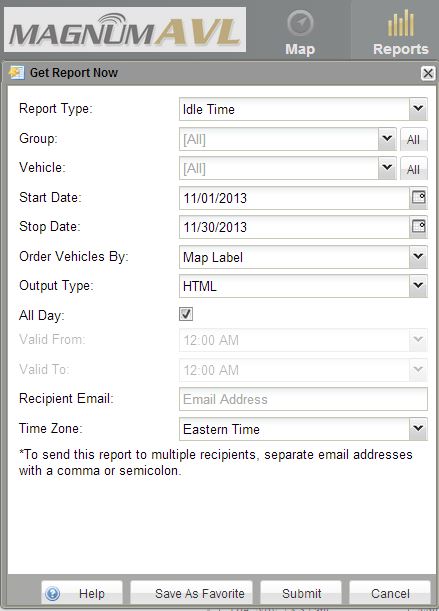
Magnum AVL GPS Provides Idle Time Per Vehicle and Alerts When AbusedIdle report Drop Down Menu

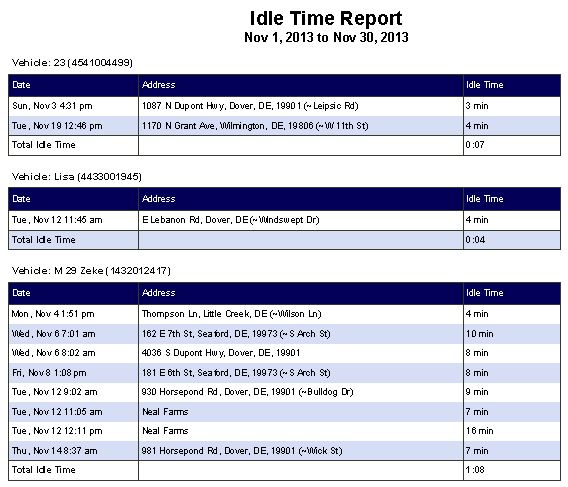
How much idling is right for your fleet? It depends on many things and starts with your ability to be able to measure the “as-is” of each vehicle. You can only manage what you can measure. Magnum AVL GPS equipped vehicles automatically track the idle time of each vehicle.

Magnum AVL GPS Idle ReportThe idle time report requires only 4 mouse clicks and will provide your fleet totals by truck during any period of time you choose. The report will show the vehicle, date and time, and the number of minutes of idle time. It will also provide a monthly total for each vehicle. Choose “Automated Reports” so it will be emailed automatically to anyone each day, week, or month.

How to Set a Real Time Idle Alert Using Magnum AVL

It is also easy to set an alert when idling is excessive so you or your driver will be notified by email or text message. This will bring real time awareness so corrective action can be taken. See how easy it is by viewing our one minute video:

Need a demonstration or more info about Magnum AVL? Give us a call or use the form below:

← Back

Thank you for your response. ✨

Motorola APX Mobile Control Head Choices Explained

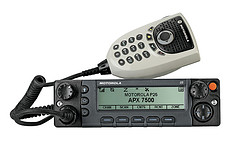
Configure Your APX With The Best Controls For Your InstallationMotorola APX 6500 O5 Head with Keypad Mic

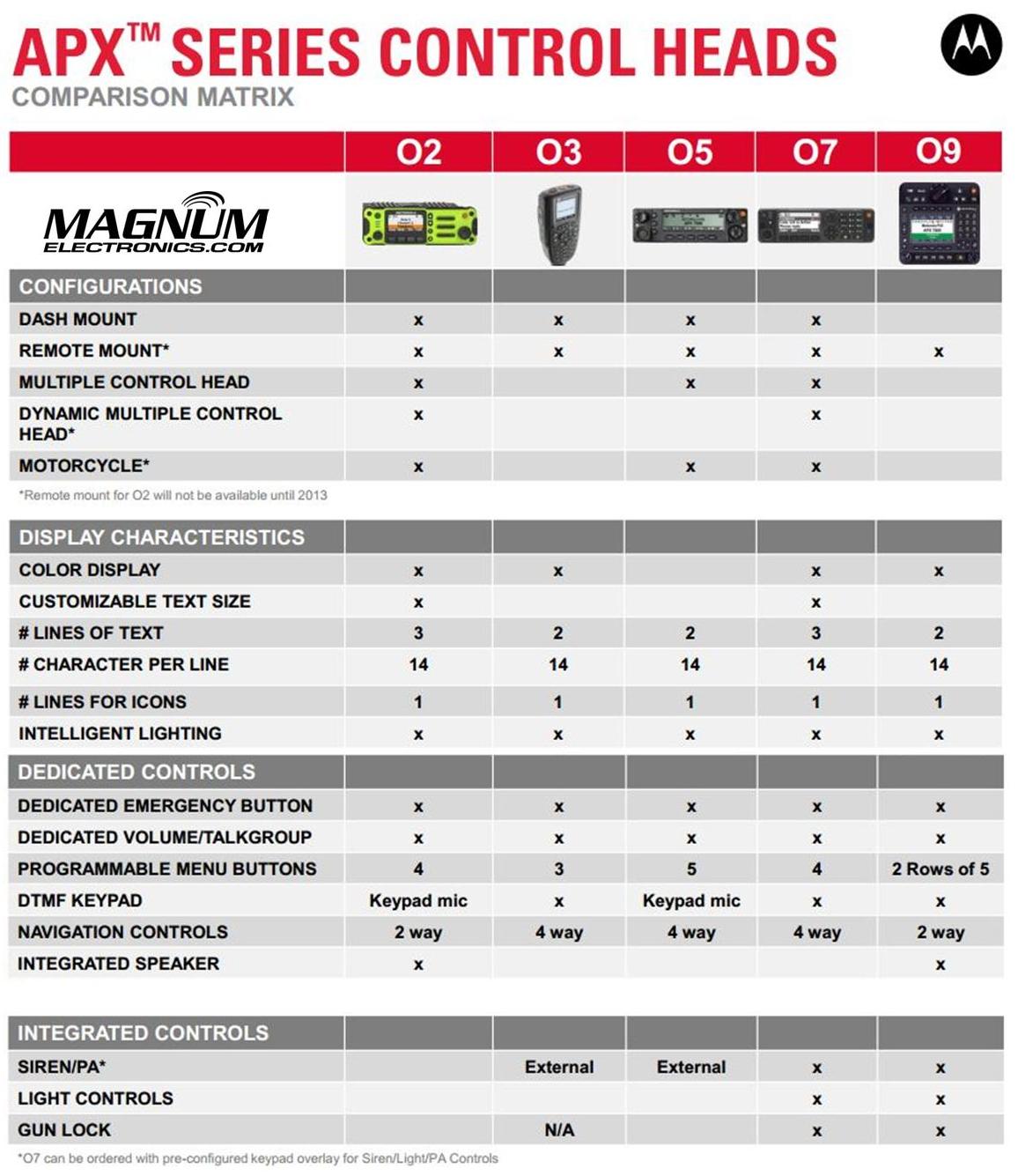
Until last year, only the O3, O5, and O9 heads were available for Motorola APX mission critical P25 mobile radios. The APX 4500 was introduced with the new O2 head for dash or remote mount configurations. There are now five control head choices available for the APX 6500 and APX 7500 radios including the O2, O3, O5, O7, and O9.

The O2 and O7 heads should be considered before you order your next APX 6500 or 7500.

APX O2, O3, O5, O7, O9 Control Head ChoicesChoose the APX O2 Head Option for Outdoor Installations 

The O2 head is rated IP55 for extreme environments and is designed for motorcycle, marine, and fire truck pump panel installations. We used this configuration for the South Bowers airboat. This rugged, XE style head has a color display, large knobs, and an integrated speaker.

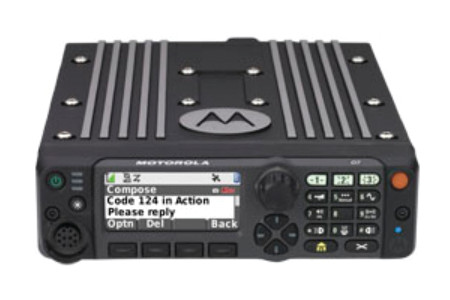
Choose APX O7 Control Head for Integrated KeypadMotorola APX O7 Control Head

The O7 control head has a flush-mount design with integrated keypad, siren, lights, public address (PA) and gun-lock controls. It features a color display with enlarged multi-function rotary knob for easier control of talk-group and volume settings.

APX O5 and Specialized O3, O9 Control Heads Are Still Available

The O5 head is still the most popular option for most applications but the new choices make it a tougher decision. The O3 hand-held control head is perfect for covert and other special installations. The O9 head is packed with features but requires a bigger footprint.


How to Choose the Correct Vertex Standard Radio Battery

Vertex Standard LogoVertex Standard recently introduced a new UNI energy platform that will eventually provide compatibility for all radio model batteries from a single charger. Older legacy chargers are not compatible with the lower cost UNI style batteries. During the transition you must be careful when choosing replacement batteries.

Vertex Universal (UNI) Chargers Require (UNI) Style Batteries

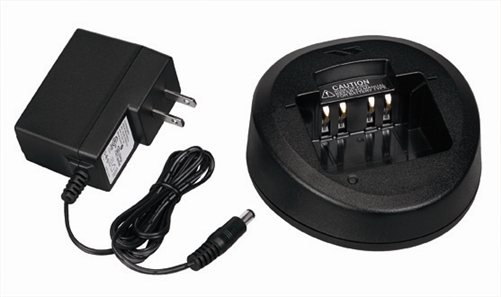
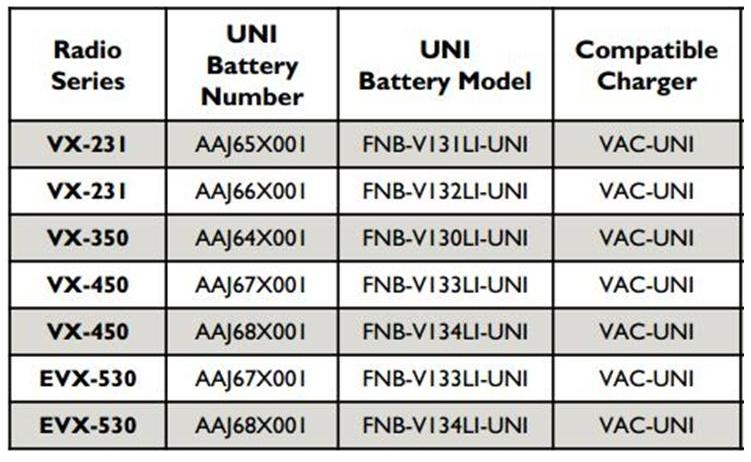
Vertex Standard UNI ChargerThe new XUAAJ72X001 VAC-UNI universal style single unit AC charger has a round pocket unlike the legacy chargers that have square corners. There is a 6 pocket 120V AC charger too. The model number is XUAAK44X001 VAC-6058. Both are compatible with UNI style batteries for the VX-231, VX-350, VX-450, and EVX-530 series so far.

Vertex Universal Charger & Compatible Batteries

Older VAC-300, VAC-450 Chargers Require Legacy Batteries

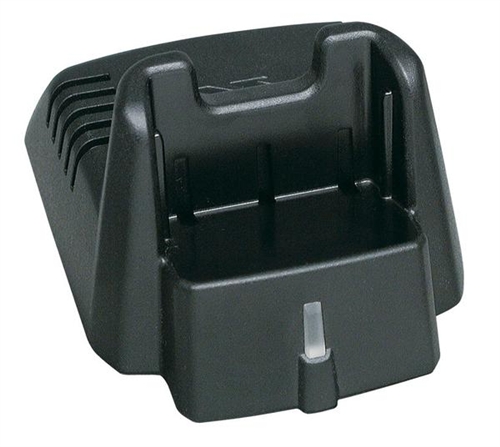
Vertex Standard Legacy ChargerThe VAC-300 and VAC-450 legacy chargers have a more square footprint. They are not compatible with the new lower cost UNI batteries. These chargers are included with VX-231, VX-350, and VX-450 series radios. The eVerge EVX-530 series includes the new UNI style.
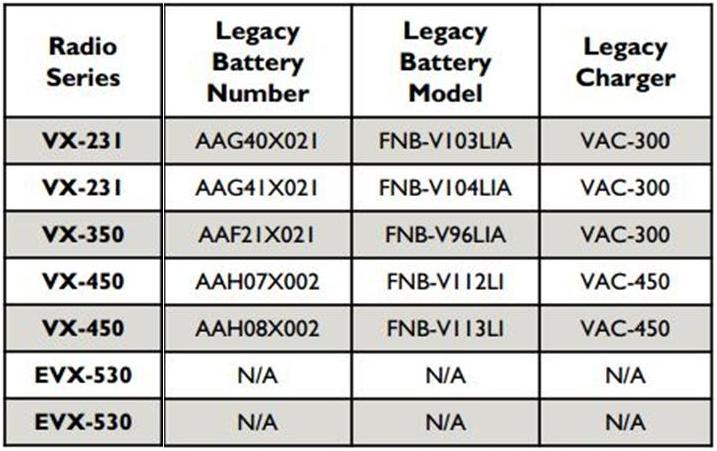
The chart below shows the legacy batteries and chargers.

Vertex VAC-300, VAC-450 Compatibility ChartMore UNI Style Batteries Coming Soon

UNI batteries for the VX-820 Series, VX-920 Series, P25 portables and cancelled models of the VX-410/420 Series and VX-160 series will have UNI solutions available soon.  We expect to see legacy chargers cancelled next year.

Link to our Vertex Standard radio, battery, and accessory pricing.

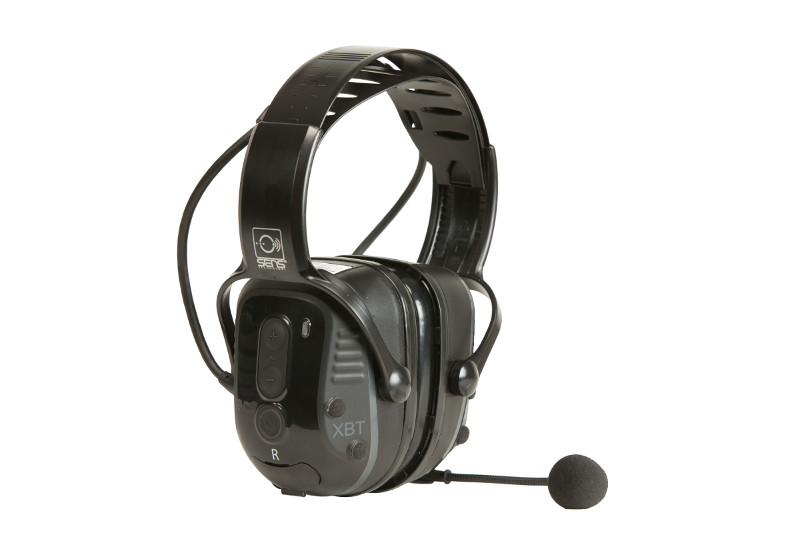
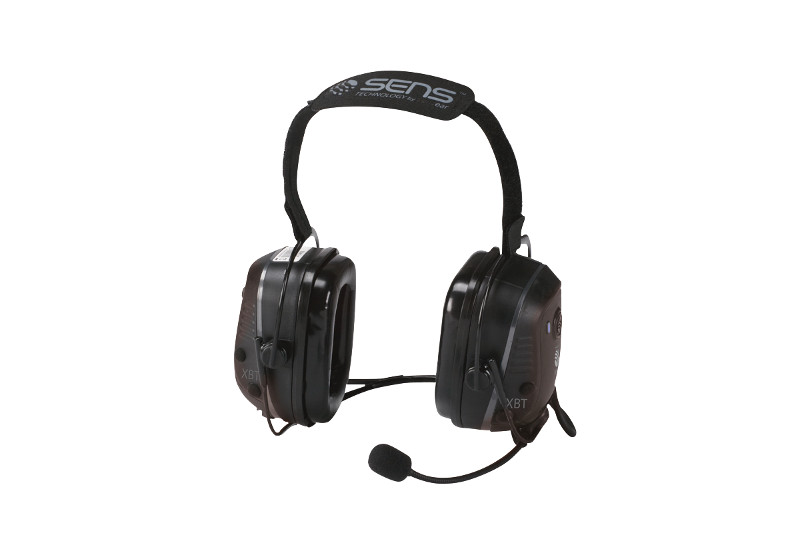
New Motorola XBT Wireless Headsets Feature SENS Technology

Motorola Solutions introduced new wireless Bluetooth headsets using Sensear’s patented SENSWireless Bluetooth Headset with SENS Technology spatial awareness technology that enhances surrounding voices while providing hearing protection. This feature benefits radio users who work in intermittent or continuous high noise industrial environments but need to hear nearby people, alarms, or alerts.

Choice of Behind-the-Neck or Over-the-Head Styles

RLN6490 - XBT Behind the Head Operations Critical Wireless Bluetooth headsetThe XBT RLN6490 behind-the neck or RLN6491 headband style are designed for Motorola Operations Critical radios and adapters. Both styles provide about 22 hours of battery life based on normal (5-5-90) operation and can be fully recharged in 7 hours. These heavy-duty headsets are rated IP54 and can be used with a NNTN8127 wireless pod for remote push-to-talk operation. The RLN640 can be used with a hardhat and provides 23dB of hearing protection. The RLN6491 headband style has an even better NRR (noise reduction rating) of 25dB.

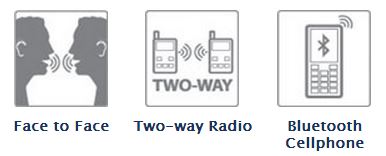
XBT Bluetooth Headset FeaturesXBT Wireless Headsets Use Standard BluetoothXBT Headsets Provide  3 ways to communicate

The SENS technology allows users wearing headsets to hear normal speech clearly when face-to-face with people without headsets. 

The Motorola XBT wireless headsets can be paired with cell phones or any 2-way radio using standard Bluetooth. For MOTOTRBO XPR 6000 series radios, choose the PMLN5712 Bluetooth adapter. XPR 7000 and SL 7000 series radios have factory installed internal Bluetooth and will pair without an adapter. APX radios and XTS 5000 PMLN5792 Mission-Critical Wireless adapters are not compatible because they contain an extra layer of encryption.

Link to the Motorola XBT Wireless Bluetooth Headsets .pdf brochure

Low Cost Digital Radios for Business – CP200d, CM200d, CM300d

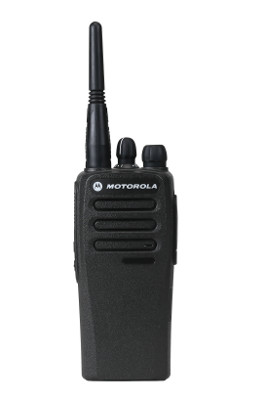
Motorola MOTOTRBO CP200d DMR Digital RadioMotorola Solutions Upgrades Popular Commercial Tier

The most popular two-way radios for business now support DMR digital voice communications with advanced features. The CP200d, CM200d, and CM300d can be ordered with both analog/digital operation or analog-only with future upgrade capability. They are compatible with other MOTOTRBO radios but are limited to conventional voice features. They will also support dual-capacity direct mode meaning you can have two simultaneous conversations on a single channel without a repeater.

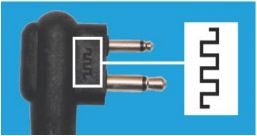
CP200d batteries and chargers are backward compatible but2 Pin Audio  Connector for CP200d audio accessories have been optimized for use with digital. Motorola’s new upgraded audio accessories are marked with a symbol on the 2 pin connector.

Improve Coverage with CM200d and CM300d with Display

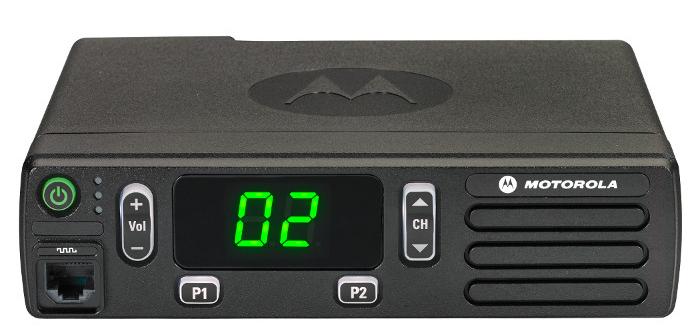
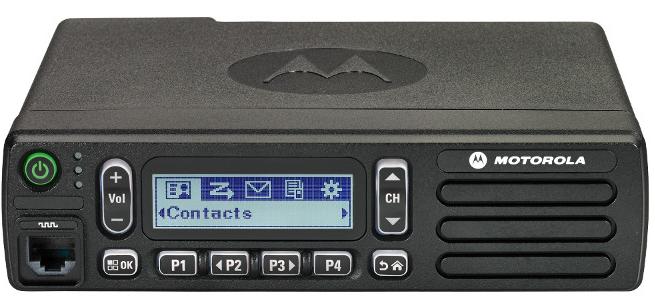
MOTOTRBO CM200d Front ViewBase, mobile, and control station operation is now possible in VHF (136-174 MHz) with 25 and 45 watt versions. UHF band will be released later this year. Both the CM200d and the CM300d support 99 channels, repeater/talkaround, and MOTOTRBO CM300d Displayvoice announcement.

The CM300d has an alpha-numeric display and two additional programmable buttons.

DMR Digital Radio Choices Slow Analog-Only Sales

The CP200d, CM200d, and CM300d are included in the “Buy 6” August Promotion that ends this month. Receive $185 from Motorola when you purchase six radios on the same invoice.

CP200 analog-only sales slowed significantly since the introduction of the XPR 3300/3500 and Vertex Standard EVX-530 series. Now it appears there is an even easier migration for commercial customers requiring basic voice communications to migrate to DMR. The most rugged business radio for the past ten years just got a new life.

MOTOTRBO CP200d Specs and Data Sheet   MOTOTRBO CM200d CM300d Specs

Why Digital is Better    CP200d Accessory Catalog

MOTOTRBO Digital CP200d Banner

Earmuff and Temple Headsets Compared

Radio Headset Comparison in High Noise

Bone Conduction vs.Traditional Earmuff Style in High Noise Areas

Motorola Solutions offers temple headsets for most two-way radio models and they continue to grow in popularity. Temple transducers use bone conduction technology and are more comfortable in hot weather as compared to traditional earmuff headsets.

Temple Headset Users TalkingTemple transducers keep the ears uncovered making it easier to communicate with the public. The speaker is muted so radio transmissions cannot be monitored and surrounding voices or other sounds can be heard normally. When used in high noise areas, earplugs can be worn for hearing protection.

Comparison Using MOTOTRBO Analog and Digital RadiosSpring and Associates HDD Driller

Spring & Associates, Inc an HDD (Horizontal Directional Drilling) contractor from Easton, Maryland relies on Motorola MOTOTRBO DMR digital radios on the jobsite.

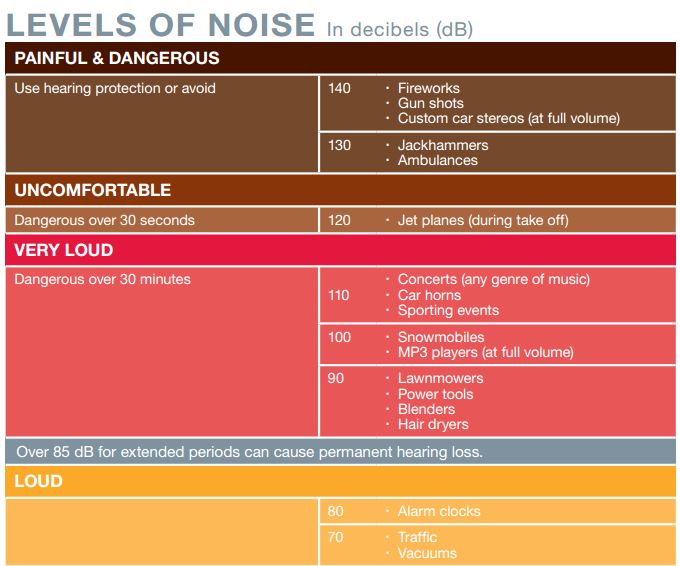
Communications are challenging because noise levels can be 100db and often exceed 130dB close to where the drill operator sits. They compared the Motorola PMLN5275 heavy-duty, dual muff headset and the PMLN5101 temple transducer.

Tests were performed in digital and analog modes using their XPR 6550 UHF two-way radios. Digital mode audio quality was found to be superior to analog. Following are comments by Rodney Spring, President  of Spring and Associates:

Muff Style Preferred in Extreme Noise Approaching 130dBLoud Noise Chart (dB)

In extreme noise, I’m guessing over 130dB, the earmuff headset was slightly preferred over the temple transducer/hearing protection muffs combo by the operator. It seems that when you idle up the drill to full power/full noise the muff headset has ZERO distortion in the receive mode, while the temple transducer has a little.

Temple Headsets Preferred Below 100dB Noise Level

In noise levels under 100dB the temple transducer was preferred because of comfort and during temporary times of low area noise, being able to remove the auxiliary hearing protection, and still be in touch with other radios while having the ability to hear people around him.