Motorola APX Mobile Control Head Choices Explained

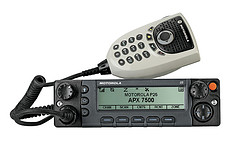
Configure Your APX With The Best Controls For Your InstallationMotorola APX 6500 O5 Head with Keypad Mic
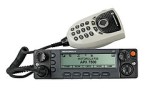
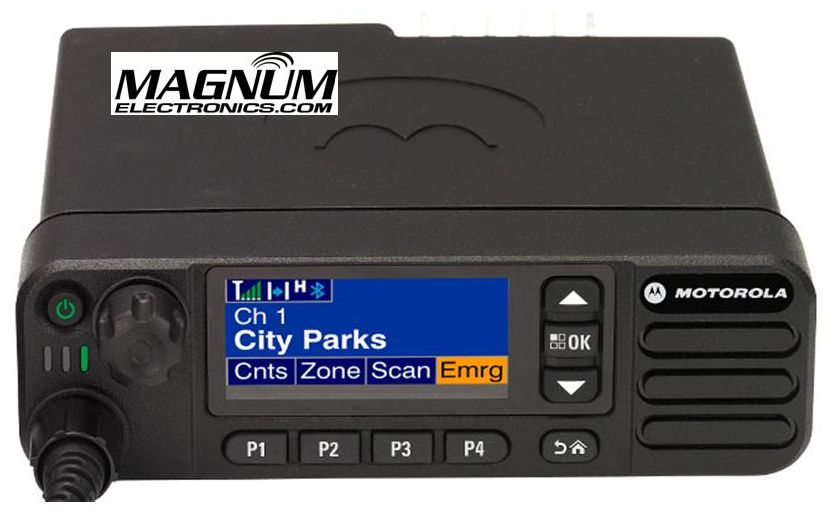
Until last year, only the O3, O5, and O9 heads were available for Motorola APX mission critical P25 mobile radios. The APX 4500 was introduced with the new O2 head for dash or remote mount configurations. There are now five control head choices available for the APX 6500 and APX 7500 radios including the O2, O3, O5, O7, and O9.

The O2 and O7 heads should be considered before you order your next APX 6500 or 7500.
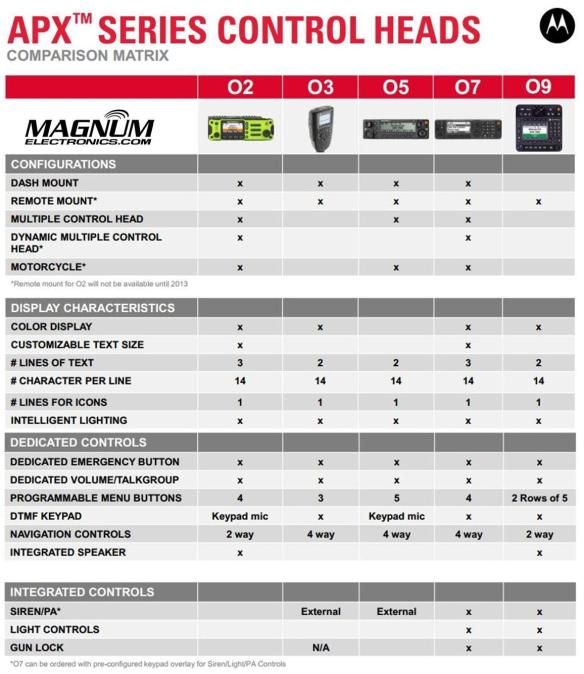
APX O2, O3, O5, O7, O9 Control Head ChoicesChoose the APX O2 Head Option for Outdoor Installations 
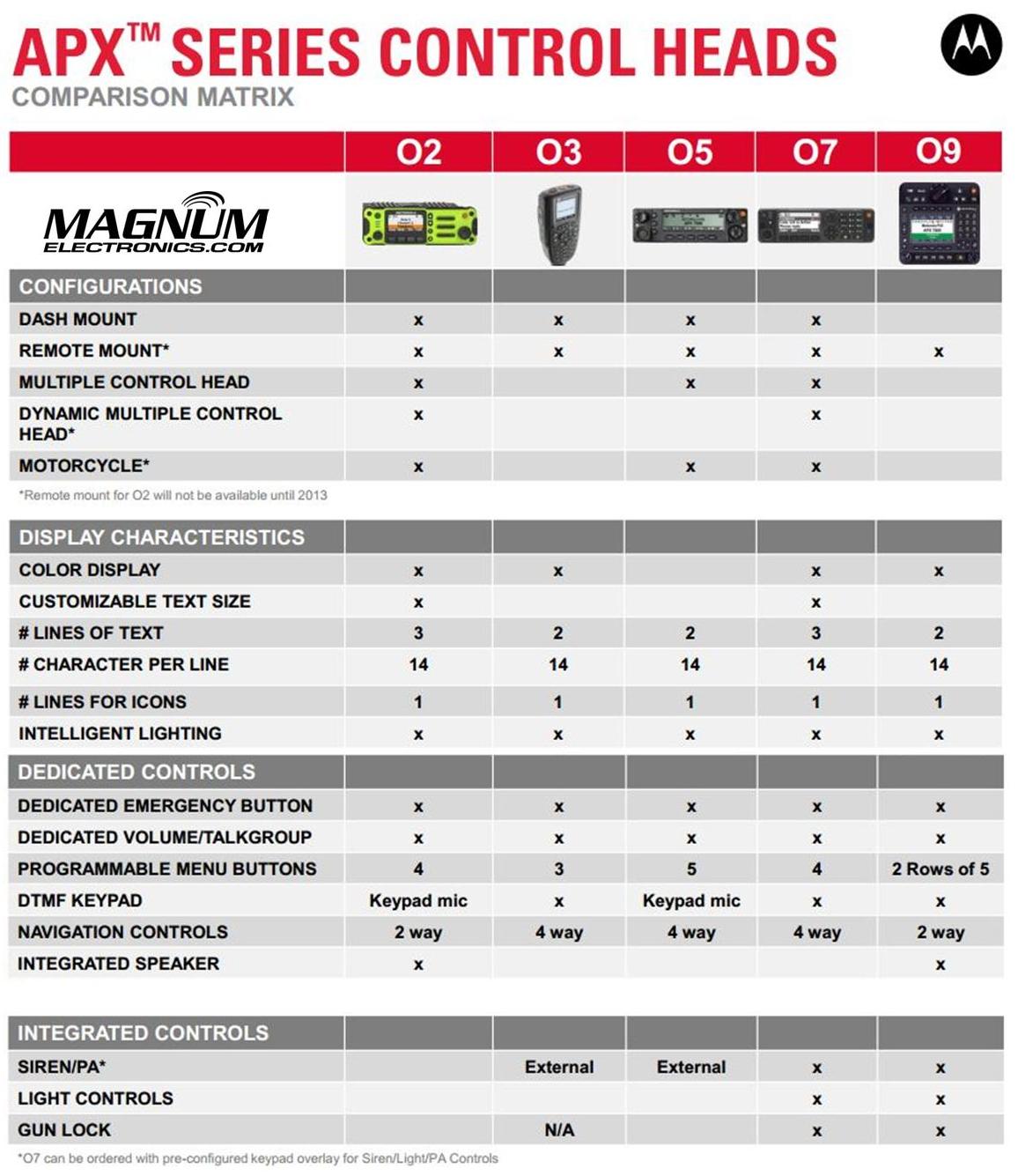
The O2 head is rated IP55 for extreme environments and is designed for motorcycle, marine, and fire truck pump panel installations. We used this configuration for the South Bowers airboat. This rugged, XE style head has a color display, large knobs, and an integrated speaker.

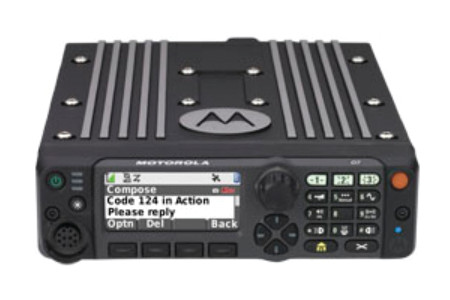
Choose APX O7 Control Head for Integrated KeypadMotorola APX O7 Control Head
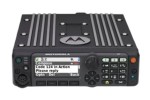
The O7 control head has a flush-mount design with integrated keypad, siren, lights, public address (PA) and gun-lock controls. It features a color display with enlarged multi-function rotary knob for easier control of talk-group and volume settings.

APX O5 and Specialized O3, O9 Control Heads Are Still Available

The O5 head is still the most popular option for most applications but the new choices make it a tougher decision. The O3 hand-held control head is perfect for covert and other special installations. The O9 head is packed with features but requires a bigger footprint.
 

Low Cost Digital Radios for Business – CP200d, CM200d, CM300d

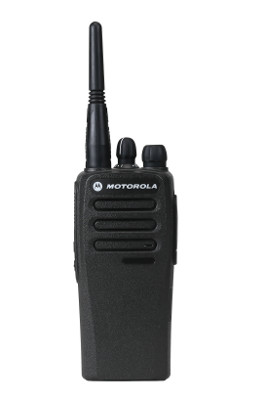
Motorola MOTOTRBO CP200d DMR Digital RadioMotorola Solutions Upgrades Popular Commercial Tier

The most popular two-way radios for business now support DMR digital voice communications with advanced features. The CP200d, CM200d, and CM300d can be ordered with both analog/digital operation or analog-only with future upgrade capability. They are compatible with other MOTOTRBO radios but are limited to conventional voice features. They will also support dual-capacity direct mode meaning you can have two simultaneous conversations on a single channel without a repeater.

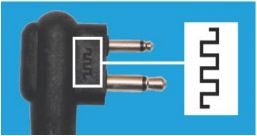
CP200d batteries and chargers are backward compatible but2 Pin Audio  Connector for CP200d audio accessories have been optimized for use with digital. Motorola’s new upgraded audio accessories are marked with a symbol on the 2 pin connector.

Improve Coverage with CM200d and CM300d with Display

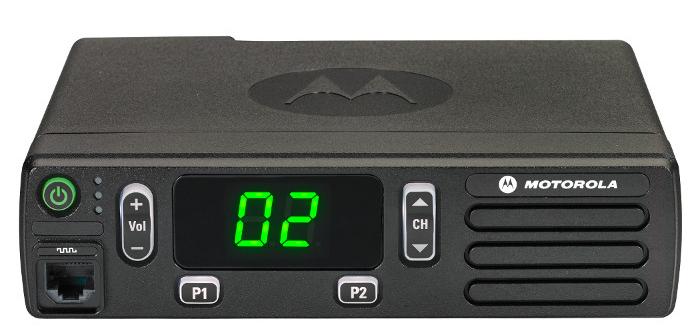
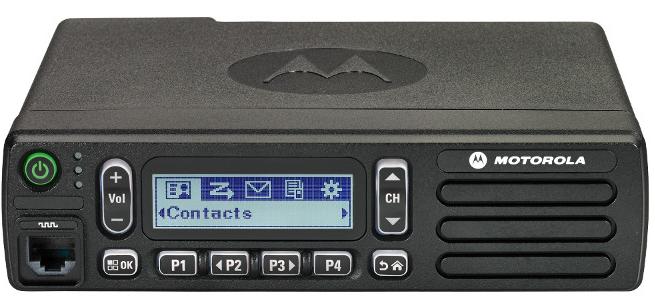
MOTOTRBO CM200d Front ViewBase, mobile, and control station operation is now possible in VHF (136-174 MHz) with 25 and 45 watt versions. UHF band will be released later this year. Both the CM200d and the CM300d support 99 channels, repeater/talkaround, and MOTOTRBO CM300d Displayvoice announcement.

The CM300d has an alpha-numeric display and two additional programmable buttons.

DMR Digital Radio Choices Slow Analog-Only Sales

The CP200d, CM200d, and CM300d are included in the “Buy 6” August Promotion that ends this month. Receive $185 from Motorola when you purchase six radios on the same invoice.

CP200 analog-only sales slowed significantly since the introduction of the XPR 3300/3500 and Vertex Standard EVX-530 series. Now it appears there is an even easier migration for commercial customers requiring basic voice communications to migrate to DMR. The most rugged business radio for the past ten years just got a new life.

MOTOTRBO CP200d Specs and Data Sheet   MOTOTRBO CM200d CM300d Specs

Why Digital is Better    CP200d Accessory Catalog

MOTOTRBO Digital CP200d Banner

New RLN6500 MOTOTRBO Bluetooth Kit Replaces HK200

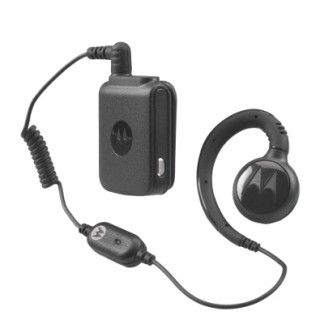
MOTOTRBO RLN6500 Bluetooth Accessory KitMotorola Solutions recently cancelled pending HK200 Bluetooth headset orders after running out of stock. The recommended replacement is the new RLN6500 MOTOTRBO Bluetooth Accessory Kit. The RLN6500 has a comfortable swivel earpiece connected to a pod with clothing clip.

The new design provides a more professional appearance and prevents others from thinking your employees are on their cell phones. Additional earpiece styles will be added in the future.

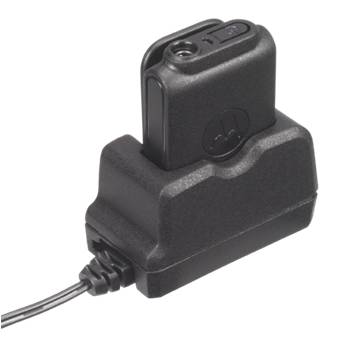
RLN6500 ChargerThe RLN6500 provides enough battery life for a full 8-10 hour shift unlike most cellular style Bluetooth headsets.

Included is a compact 120V AC charger with cradle for quick and easy charging for the next shift.

Designed for MOTOTRBO DMR Bluetooth Enabled Radios

The RLN6500 is designed to be used with MOTOTRBO Bluetooth enabled radios including the SL 7550, XPR 5350, 5550, XPR 7350, 7550. It is also compatible with XPR 6100, 6300, and 6500 series radios using the PMLN5712 adapter.PMLN6397 Replacement Swivel Earpiece and In-line Mic

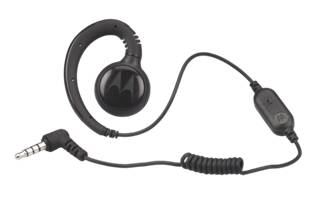
It is easy to share among employees with extra PMLN6397 earpieces with in-line mic (pack of 3). The earpiece has a antimicrobial coating for healthcare applications.

Once paired, the headset will reconnect with the radio the next time it is turned on. It is not compatible with the PMLN5993 Bluetooth adapter with touch pairing so you will need to keep it paired with the same radio. The RLN6500 is not compatible with cell phones so you are less likely to lose them due to theft.

Lower Cost Alternative for MOTOTRBO Bluetooth Audio Accessories

The RLN6500 is priced lower than the Operations Critical NNTN8295 wireless earbud with pod and the NNTN8125, NNTN8126 earpieces.

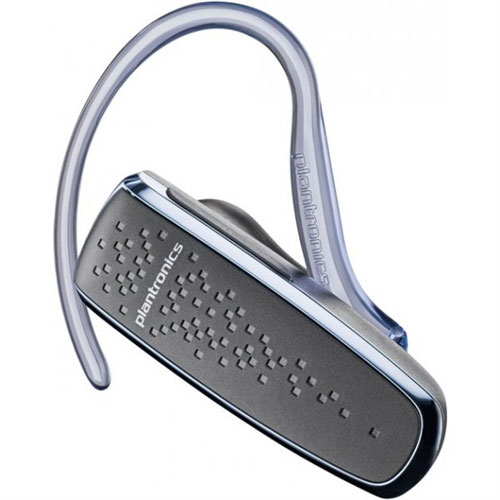
Plantronics-85550-01 M50For those who need a HK200 replacement with long battery life that will also pair with a cell phone, we recommend the Plantronics M50 85550-01.

It has standard Bluetooth 3.0, provides 9-11 hours of typical use, and uses a micro-USB charger connector.

For more Motorola Bluetooth accessories download the Operations Critical MOTOTRBO Wireless Accessory Catalog.

Over-the-Air Programming Steps for Motorola DTR Digital Radios

Written by Jeremy Byler, CETsr

How to Remotely Add or Update a DTR Radio Contact to your Fleet

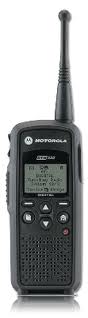
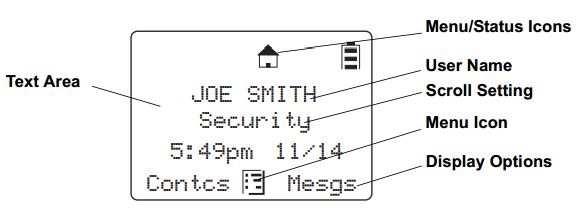
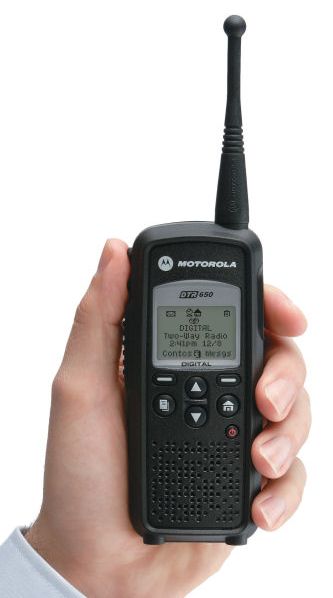
Motorola DTR650 License Free RadioMotorola DTR650 digital radios can be programmed with a unique ID so other users can identify the person transmitting. Most of our customers request that we program their radios with employee names or job functions. This is helpful during emergencies, call alerts, and one-to-one communications.Info Displayed on DTR

When an additional radio is purchased, replaced, or updated the digital ID must be programmed in all of the existing radios. This is easily accomplished using the DTR650’s over-the-air programming feature.

All DTR Radios Must Be Turned “ON” and In Range

After the new radio is programmed using Motorola’s DTR CPS software and programming cable, begin by inserting the battery and connecting the antenna. All radios must be powered ON and within range of the new DTR for programming to be successful.

Use Cloning Mode to Add Contacts Wirelessly

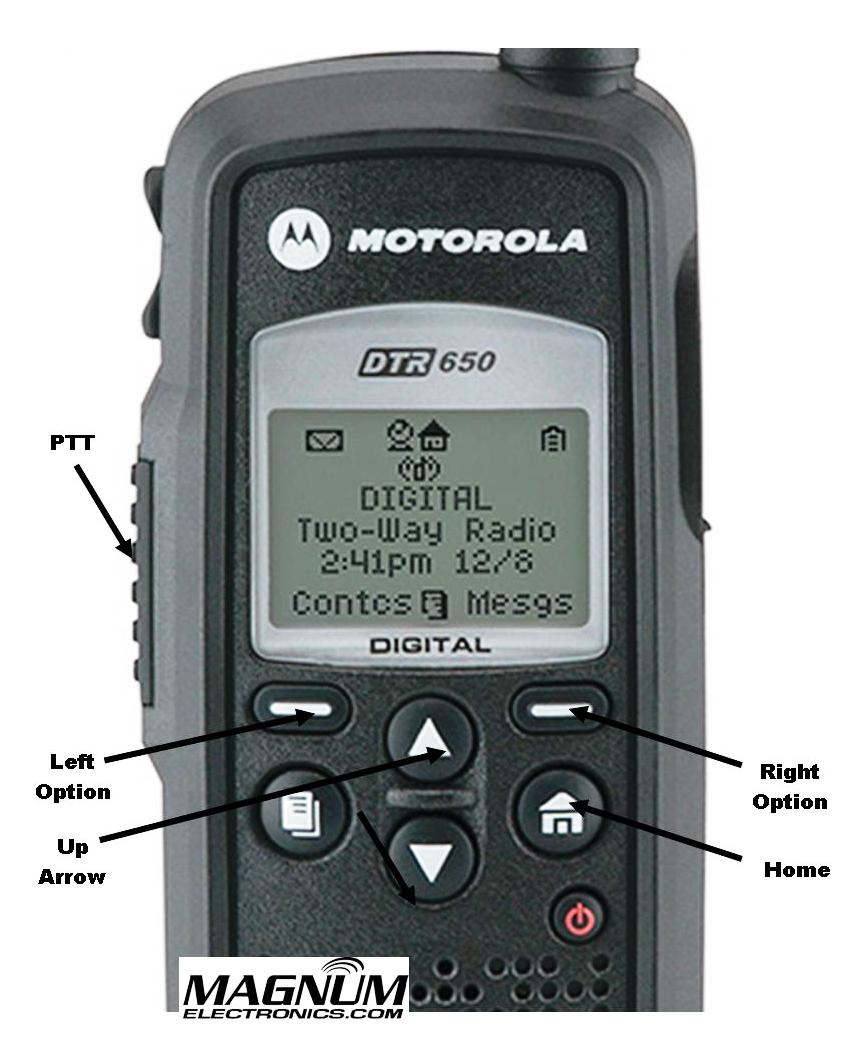
To place the new radio in cloning mode a series of button presses is required. Refer to the picture for button locations and follow the steps below:DTR Radio Button Labels

  • Hold down the “Home” button and press the PTT (push-to-talk) button three times
  • Press the “Left Option” button
  • Press the “Up Arrow” button
  • Press the “Right Option” button
  • Hold down the “Home” button and press the PTT button three times
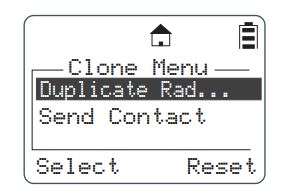
  • When done correctly screen will display cloning mode

DTR Radio Cloning Menu Mode

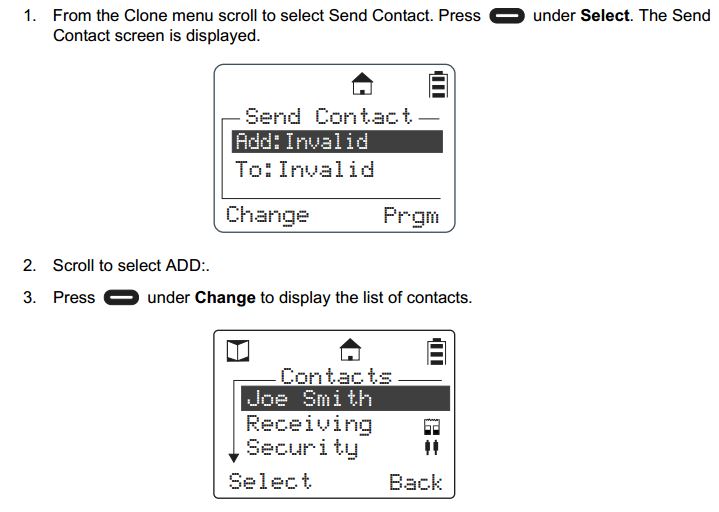
From Cloning Menu Choose “Send Contact”

When the DTR is in cloning mode, scroll to the “Send Contact” and choose the contact you want to send to the other radios per steps 1-3 below.Steps 1-3 Adding DTR Contacts Remotely

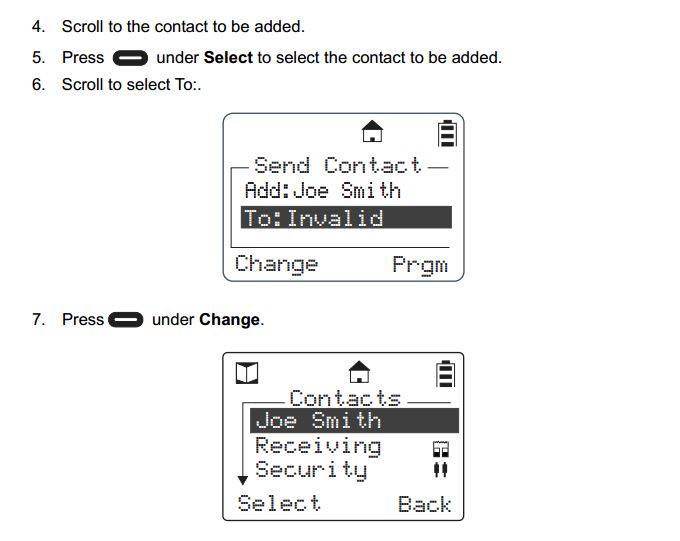
 Select the Contact You Want to Send to the Other DTR Radios

Steps 4-7 shows how to scroll through the list of radio contacts and change to the one you want to send to the other radios in your fleet.

Steps 4-7 Add DTR Contacts Remotely

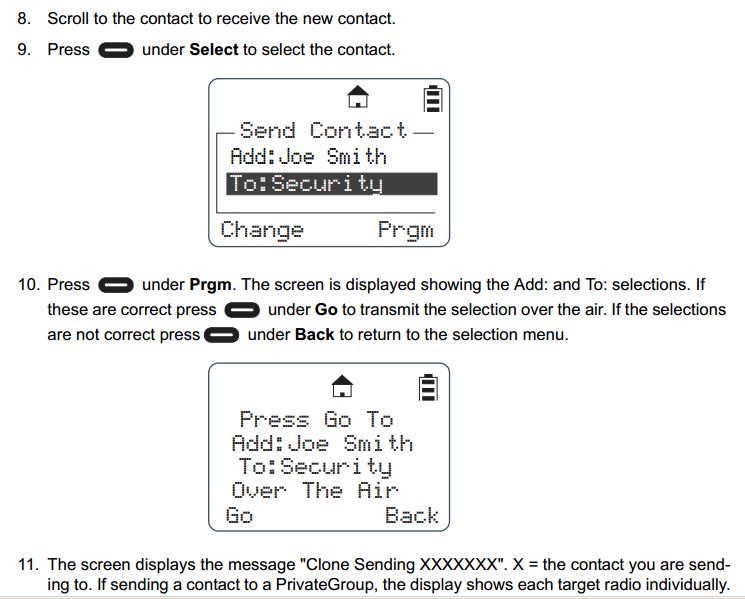
Press “Program” and “Go” to Finish the Cloning Operation

Steps 8-11 include selecting the target radio or radio group and sending the info wirelessly using the “Program” and “Go” soft buttons.

Steps 8-11 Add DTR Contacts Remotely

After operation is completed, a status message will appear. It will either display “Successful” or show a list of radios that failed. A radio will fail if it is powered off or is out of range.

If only a single radio needs to be updated, choose the name of the radio that needs to be updated instead of the group. Once this operation is successfully completed and all your radios have been updated with the new radio’s contact information, your DTR system will communicate properly.

For more information download the Motorola DTR Series User Guide and the Generation 3 DTR650 Product Training presentation from Motorola Solutions.

Motorola IMPRES Battery Tips and Charger Indicator Lights

Proper IMPRES Battery Care Starts With Initialization

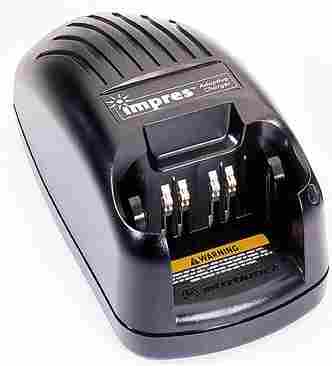
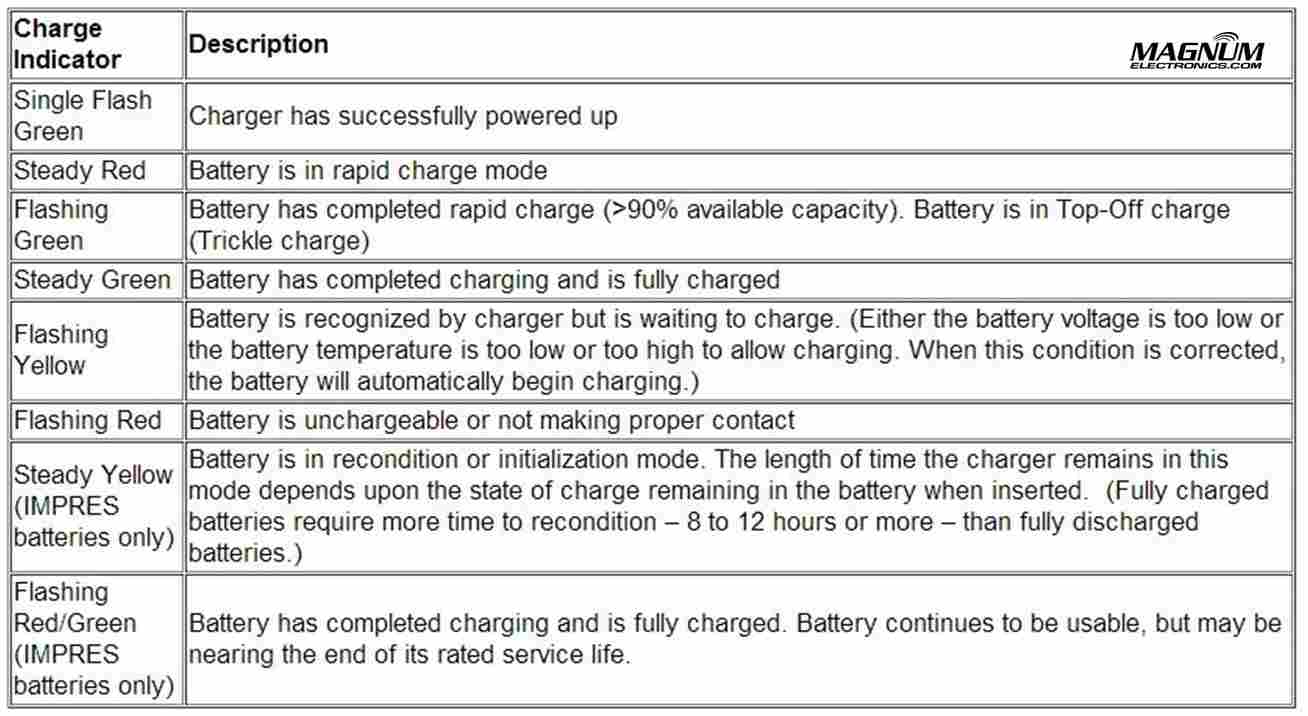
Motorola IMPRES ChargerA Motorola IMPRES battery must be initialized by an IMPRES charger the first time it is charged. This process is indicated by a STEADY YELLOW light on the charger indicator (the same as if the battery were reconditioning). The process is automatic, includes an initial reconditioning of the battery, and begins charging upon completion of this process.

This process requires approximately 12 hours depending on the capacity. Do not remove the battery from the charger until the STEADY GREEN light is on.

IMPRES Indicator Light Chart with Explanations

Motorola IMPRES Charger Light Indicators

IMPRES Automatic Battery Conditioning

Motorola IMPRES Adaptive Chargers, when used in conjunction with a Motorola IMPRES battery, have the ability to determine the appropriate time to recondition the battery. When an IMPRES battery is properly inserted into the charger, the charger determines if it is appropriate to recondition the battery. If the battery needs reconditioning, the charger automatically indicates a STEADY YELLOW.

This process may take up to 12 hours to complete, depending upon the state of charge and capacity rating of the battery when it is inserted. It is important to note, for this process to be effective, the IMPRES battery must be allowed to complete the recondition/recharge process. Leave the battery in the charger until the charger indicates a STEADY GREEN. At the completion of the recondition cycle, the charger automatically recharges the IMPRES battery.

How to Terminate the IMPRES Conditioning Process

At any time during the reconditioning process of a Motorola IMPRES battery (STEADY YELLOW indication), reconditioning may be terminated by removing and reinserting the battery back into the charger within 5 seconds. This causes the charger to terminate the reconditioning process and begin the charging process. The charger indicator changes to a STEADY RED. The charger will attempt to recondition the battery at the next battery insertion.

Manually Initiating the IMPRES Reconditioning Process

Within 2-1/2 minutes of the initial insertion of an IMPRES battery (STEADY RED indication), remove and reinsert the battery within 5 seconds to manually force reconditioning to occur. The charger indicator changes from a STEADY RED to a STEADY YELLOW. This forces the charger to recondition and automatically recharge the battery. This is a useful feature to have when IMPRES batteries have been in storage for several months or longer. Two or three manual recondition cycles may be required to rejuvenate the batteries, due to long term storage conditions.

Complete List of Motorola KVL Encryption Keyload Cables and Adapters

Motorola KVL 3000 and 4000 Cables

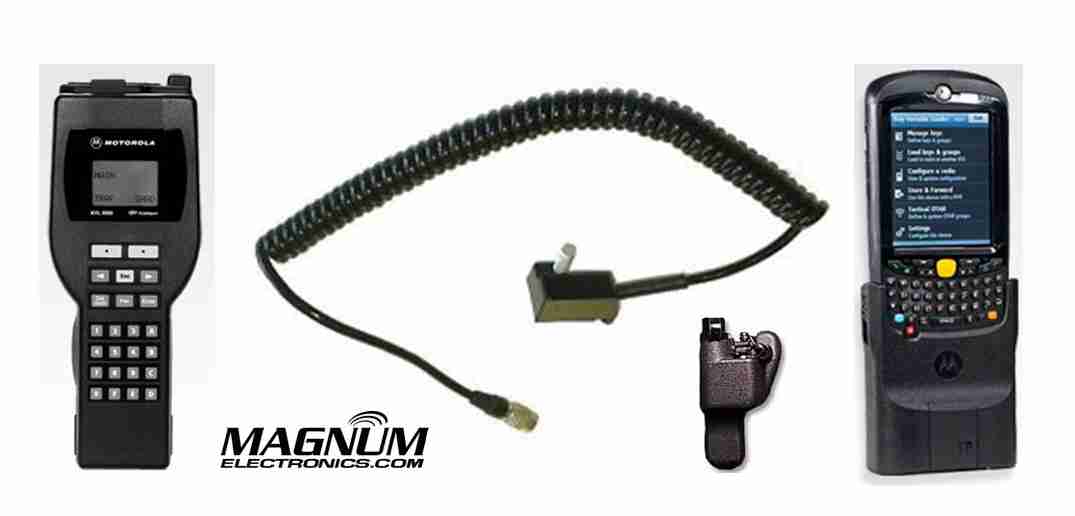
KVL 3000/4000 Keyload Interface Cables and Adapters

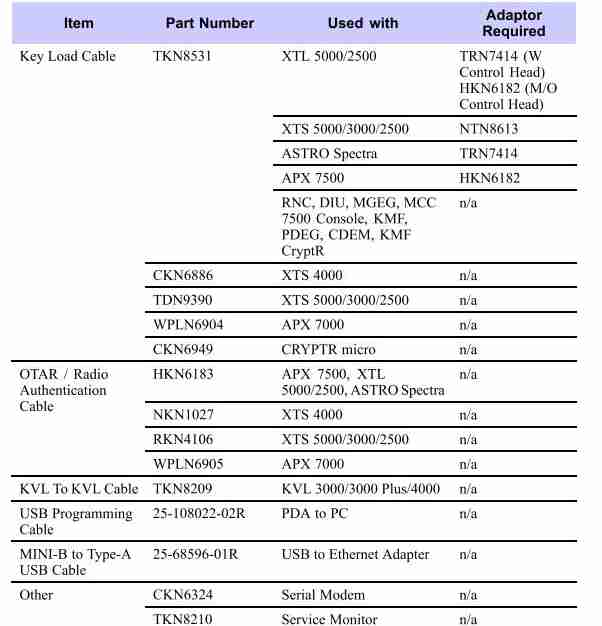
Most Motorola military and law enforcement 2-way radio communications uses an encrypted algorithm for secure voice messages. The encryption key is inserted in the radio using a KVL 3000 or KVL 4000 as shown. The basic interface cable is the Motorola TKN8531 and an adapter specific to the radio model. XTS 5000/2500 series portable hand-held radios require a NTN8613 adapter. APX 7500/6500  and most XTL 5000/2500 mobile radios need the HKN6182.

APX 7000/6000 series use the WPLN6904 cable that does not require an adapter.

OTAR and Radio Authentication Cables 

For systems using OTAR (over-the-air-rekeying) or radio authentication, the KVL uses a different set of cables without the need for adapters. APX, XTL, and Astro Spectra mobile radios use the HKN6183. XTS portable radios require the RKN4106 and APX 7000/6000 portables use the WPLN6905 cable.

For a complete list of KVL 4000 cables, adapters, and accessories, see the charts below.

Motorola KVL Interface Cables and Adapters

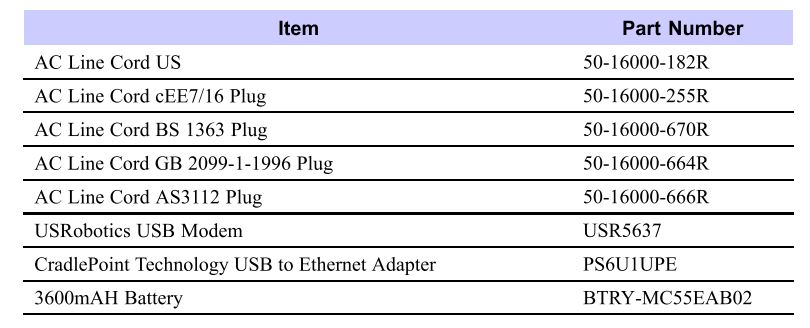
Optional accessories for the KVL 4000:

KVL Optional Accessories

Motorola Temple Transducers Provide Discreet Listening

2-Way Radio Headset Keeps Ears Uncovered

Motorola 2-way Radio Temple TransducerTemple transducers are available for most Motorola 2-way radios and are the only audio accessory that keeps your communications discreet without covering your ears. Loud and clear radio transmissions are received using transducers that rest on each temple. The ears are uncovered so you will hear normally when there is no radio traffic. People close by will not hear radio messages keeping your communications private.

Use Temple Transducers in High Noise Environments with Earplugs

Temple transducers can be more comfortable than muff style headsets in hot weather orSpring & Associates Driller when working on loud machinery. Maryland based Spring and Associates performed a comparison on their job site with extreme machinery noise using MOTOTRBO XPR6550  radios. The PMLN5101 temple transducer was preferred except when extreme noise levels approached 130dB.

Choose the Correct Temple Transducer for Your Radio

Motorola offers temple transducers with connectors for most of their radios. The new APX series radios have a direct wire connector and a new boomless model that is compatible with the APX display microphone.

APX 7000, 7000XE, APX 6000, 6000XE, APX 4000 Radio Models

RMN5116 Temple TransducerFor the new APX P25 series, choose the PMLN5101 temple transducer with boom microphone.

The boomless RMN5116 is the correct choice if you use a APX display remote speaker microphone.

XTS 5000, XTS 2500, XTS 1500, PR1500, MT1500 Radio Models

Rugged Temple Transducer

RMN5049

The standard temple transducer with the XTS series connector is the RMN4049. There is also a more rugged version, RMN5049, that includes an adjustable headband keeping it more secure when repelling, jumping, or performing other physical activity. These are also compatible with HT1000, JT1000, MTS2000, MT2000, MTX8000, MTX9000, XTS3000, and XTS3500.

MOTOTRBO XPR 6100, 6350, 6550, 7350, 7550 Radio ModelsMotorola PMLN5101

All Motorola XPR 6000 and 7000 series radios are compatible with the PMLN5101 temple transducer. An oversized PTT and coiled cord is included.

There is no temple transducer available yet for the XPR3300, XPR3500, or SL7550.

Motorola HT750, HT1250, HT1550, PR860 Radio Models

The RMN4048 is the correct temple transducer model if you have a Motorola HT750/1250/1550, PR860, MTX850, MTX8250, MTX950, or MTX9250.

There is a rugged version, RMN5048 with an adjustable headband too. Both have a large PTT body switch.

Motorola EX500, EX560, EX600 Radio Models

The Motorola EX radio compatible temple transducer is the PMLN4585.

Motorola BPR40, CP110, CP185, CP150, CP200, PR400

CP200 Temple TransducerChoose the PMLN5003 boomless lightweight temple transducer with in-line microphone and 2 prong connector. Adjustable for use on long shifts. Not suitable for high noise environments.

Also compatible with P1225, CP125, VL130, CT150, CT250, CT450, GP300.

Motorola DTR410, DTR650, VL50

The RMN5114 is the correct choice. Although it uses a similar sized 2 prong connector like the PMLN5003, they will not fit the jack.

Advantages of New Motorola DMR MOTOTRBO XPR 5550

New Motorola XPR 5000 Series Supports Analog and Digital DMR

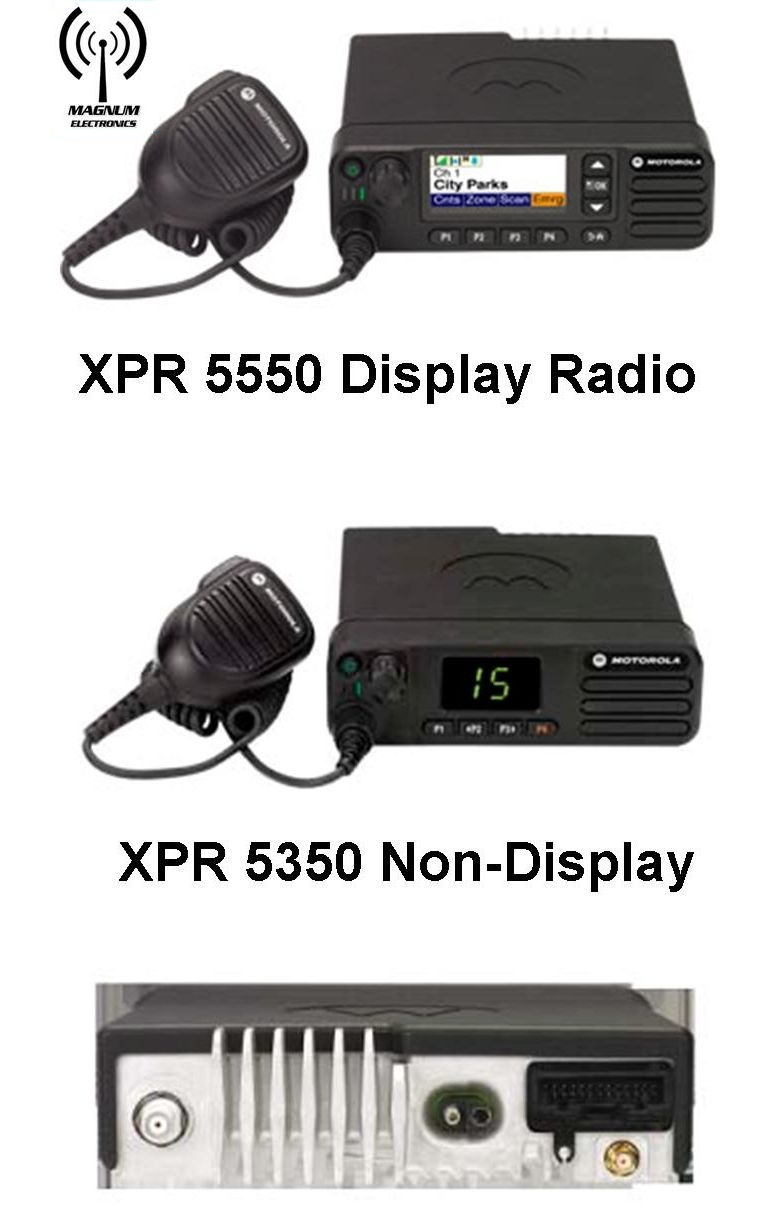
Motorola MOTOTRBO XPR 5350 & XPR 5550 Motorola’s newest base/mobile offering to the MOTOTRBO DMR platform is the XPR 5000 series. Introduced in the VHF and UHF bands, the radios can be programmed with up to 1,000 analog and digital channels providing easier migration and interoperability. 

The flagship XPR 5550 includes a color display with day and night modes for easier viewing. The XPR 5350 has a numeric channel display and 32 channel capability.

An internal GPS receiver and text messaging is standard on both models.

New XPR 5000 Series Includes Embedded Wireless Bluetooth for Voice and Data

Workers can monitor and respond to voice radio traffic when not in the vehicle using any standard Bluetooth headset. This can enhance productivity by giving your workforce the ability to stay in touch when away from the mobile radio.

Bluetooth is also an easy way to connect hand-held scanners, bar code readers, and other data collection devices. You will need to purchase the HKVN4088 optional software license at a cost of $50 to enable the data transfer feature. MOTOTRBO already supports many independent software applications that enhance mobile worker productivity.

XPR 5550 5 Line Color Display Provides Day and Night Modes for Easier Viewing

Motorola XPR 55550 Display in Night Mode

Motorola XPR 5550 Display in Night Mode

Text messaging, mobile workforce productivity applications, and large channel lists are easily managed with the XPR 5550 5 line color display. The bright display can be viewed easily in broad daylight or in low light environments with night mode. Four programmable buttons can be labeled for your operational needs and a home button provides an easy user interface.

Dual Function Channel/Volume Knob Eliminates Rocker Switches

The XPR 5000 series incorporates a single knob for both volume and channel control. With a short press of the knob you can change your volume and channel easily. The XPR 5000 platform also has a nice feature called “intelligent audio” that increases or decreases the volume automatically if surrounding noise conditions change.

One Minute Video Summary of the XPR 5000 Series

Want to Buy License-Free FRS Talkabout Radios? Read this First

There are Better Choices for License-Free On-site Radio Communications

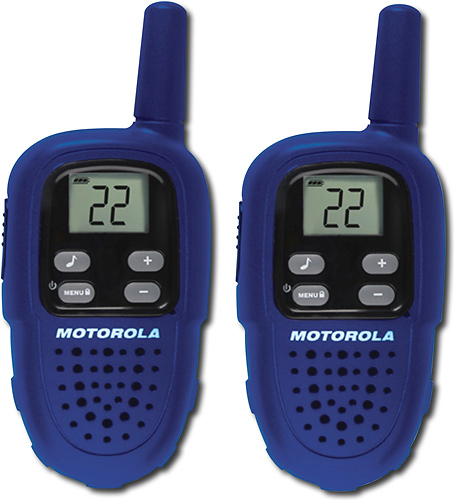
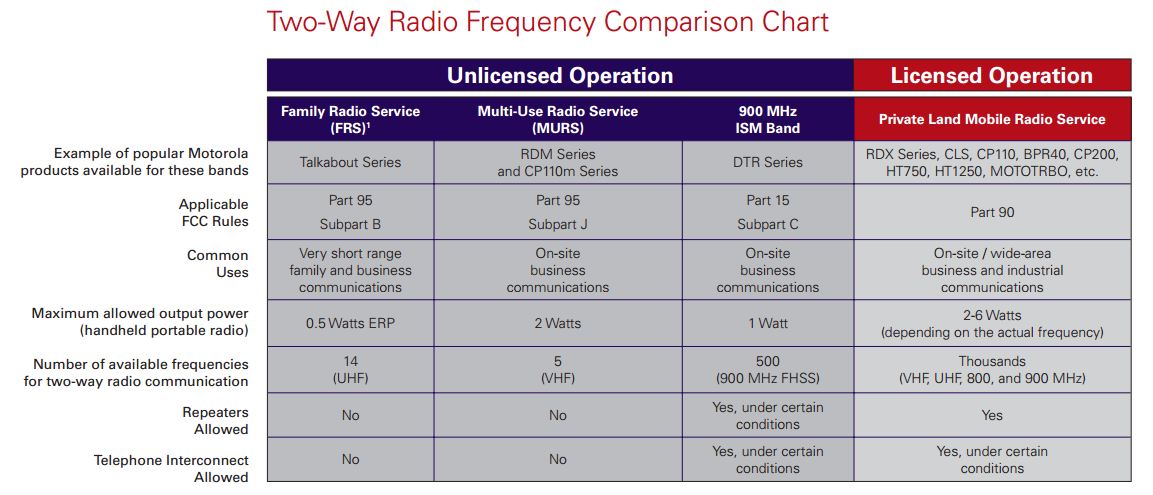
FRS Radios are low power and License freeHotel and retail business owners and general managers often purchase analog Part 95 FRS (Family Radio Service) radios for on-site communications. You can find them almost anywhere at very low prices and there is no FCC license required.

After a few months, the batteries do not last an entire shift, dead spots increase, and interference from children can become unbearable when directing your employees. Some FRS radios also have higher power GMRS (General Mobile Radio Service) frequencies for better range but require a costly FCC license in an individual’s name – not the business.

Part 95 MURS Band is a Better Choice for License Free Communications

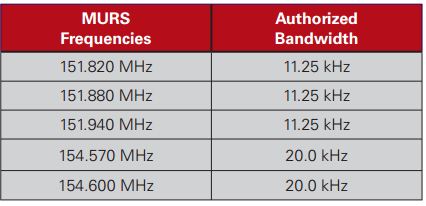
Part 95 MURS Frequencies

MURS (Multi-Use Radio Service) band consists of five frequencies designated for private, 2-way, voice and data communications for individual and business use. Power output limitation is two watts and 4 times greater than FRS. Although there is no protection from possible interference from other users, the MURS band is a much better alternative when choosing license-free channels. Repeaters and signal boosters are not allowed and operation in aircraft is prohibited.

Motorola CP110m is Designed for MURS Operation

The Motorola CP110m is available with 2 or all 5 MURS analog channels.Motorola CP110m MURS 2 & 5 channel radios It provides better battery life and is rated IP54/55 for water and dust resistance. It uses the same batteries and accessories as the Motorola RDX series.

The CP110m will provide coverage in a 10 story hotel up to 200,000 square feet. You can purchase an optional 2 or 3 year warranty. Expect the radio to be in service for a long time. Scan, VOX (voice operated transmit) hands-free operation, and voice scramble provide a lot of value for the low price.

CP110m programming software is free from Motorola and cloning is easy using the included chargers. All you need is the USB programming cable (RKN4155) and a cloning cable (RLN6303) if you want the ability to make any changes to your privacy codes or frequencies.

Many other Motorola and Vertex Standard analog portable radio models can be programmed to use MURS channels using the low power setting. This helps with interoperability when working with other companies and provides more flexibility for your future requirements.

Part 15 900 MHz ISM Band is License Free for DTR Digital RadiosMotorola DTR digital license free radio

900 MHz ISM band provides better building penetration for up to 20 floors.The DTR650 digital radio can also provide one-to-one private communications when needed. It is only compatible with other DTR radios.

Text messaging for discreet messaging, unit ID, long battery life, and call alert are just some of the digital features included. Free programming software is also available for this model.

Priced significantly less than $300 it is the best choice for on-site communications using license-free spectrum.

FCC License Free vs. Licensed 2-way Radio Spectrum

Obtaining a FCC license is still the best alternative for your business because you will have less interference, more range, and many more radio choices. We have many customers using MURS and ISM band that have are very satisfied with their radios for many years. Feel free to contact us to determine if license free communications will work for your business.

FRS MURS ISM FCC License Comparison Chart

Check the Date Codes of Your 2-Way Radio Batteries

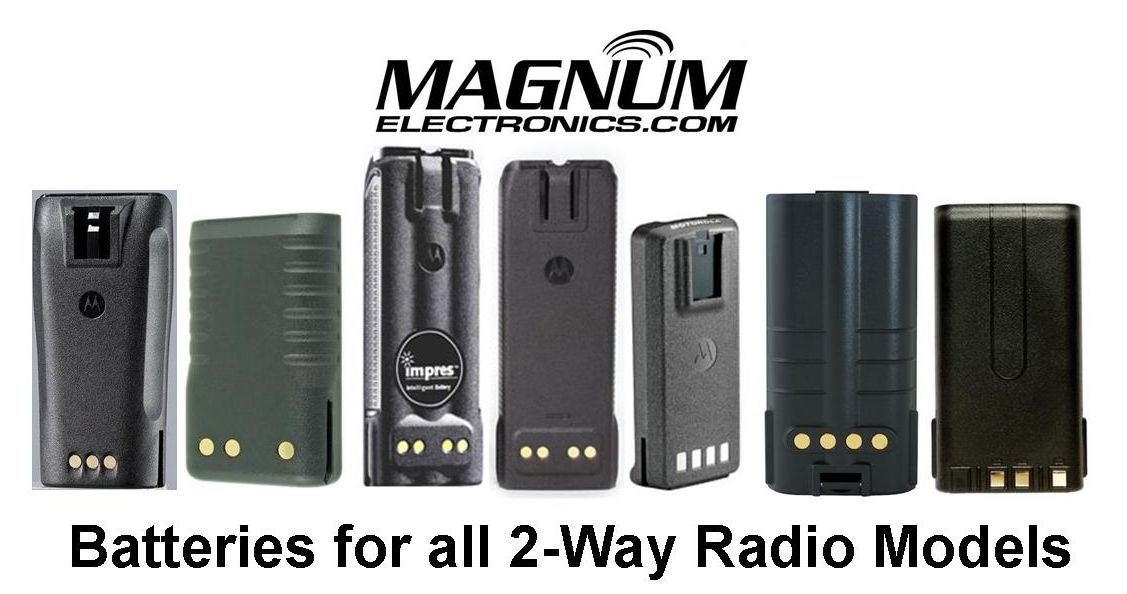
Magnum Electronics Supplies Batteries for All 2-Way Radio Models

It is that time again to check your radio batteries so you keep your communications loud and clear. Batteries begin to degrade after 18-24 months of use and can affect radio performance. Many intermittent radio problems are solved with a fresh battery.

How to Read a Motorola Battery Date Code

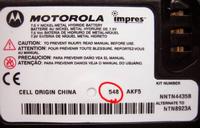
All Motorola batteries have a 3 digit date code on the battery label. Check the date codeMotorola Battery Label and Date Code Circled on your Motorola battery and if the first digit is a “0” or “9” it is a good time to replace it.

The first digit represents the “Year” and the next digits are the “Week” manufactured. For example; 036 is the 36th week of 2010.

All Motorola batteries carry a replacement warranty of at least a year after the date code and probably longer if marked IMPRES or contain NiCD cells.

Replacement Batteries for Motorola, Vertex, & Other Radio Manufacturers

We carry Motorola Original OEM, Vertex-Standard OEM, and Power Products batteries for all current and discontinued radio models.

Below are links to the most popular and recommended batteries:

We also carry replacement batteries for Harris, Kenwood, Icom, Tait, and many other hard to find models. Check our 2-Way Battery selection or call us and we will be happy to help you find the best battery for your needs.